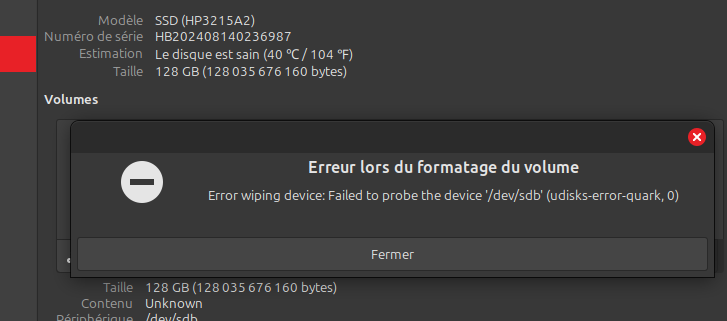
Super merci
Je sais que j'ai déjà smartcontrol sur ma machine, par contre je ne sais pas trop comment analyser la somme d'infos
J'ai donc lancé un smartctl -i /dev/sdb
Code : Tout sélectionner
1+0 enregistrements lus
1+0 enregistrements écrits
1048576 octets (1,0 MB, 1,0 MiB) copiés, 3,93503 s, 266 kB/s
claude@claude-B450M-DS3H-V2:~$ sudo smartctl -i /dev/sdb
[sudo] Mot de passe de claude :
smartctl 7.4 2023-08-01 r5530 [x86_64-linux-6.8.0-63-generic] (local build)
Copyright (C) 2002-23, Bruce Allen, Christian Franke, www.smartmontools.org

=== START OF INFORMATION SECTION ===
Device Model:     SSD
Serial Number:    HB202408140236987
LU WWN Device Id: 0 000000 000000000
Firmware Version: HP3215A2
User Capacity:    128 035 676 160 bytes [128 GB]
Sector Size:      512 bytes logical/physical
Rotation Rate:    Solid State Device
Form Factor:      2.5 inches
TRIM Command:     Available
Device is:        Not in smartctl database 7.3/5528
ATA Version is:   ACS-4 T13/BSR INCITS 529 revision 5
SATA Version is:  SATA 3.2, 6.0 Gb/s (current: 1.5 Gb/s)
Local Time is:    Sun Jul 27 20:51:34 2025 CEST
SMART support is: Available - device has SMART capability.
SMART support is: Enabled
Puis un
Code : Tout sélectionner
/usr/sbin/smartctl -a /dev/sdb
smartctl 7.4 2023-08-01 r5530 [x86_64-linux-6.8.0-63-generic] (local build)
Copyright (C) 2002-23, Bruce Allen, Christian Franke, www.smartmontools.org

Smartctl open device: /dev/sdb failed: Permission denied
Et là patatra la ligne que tu désigne comme la plus importante n’apparaît pas
Dois je comprendre que mon DD apparaissant comme sain est malgré tout HS ?
AHhhhhhhhhhhhhhh !!!
Je viens de voir passer un SMART overall-health self-assessment test result: PASSED
Code : Tout sélectionner
sudo smartctl -s on -a /dev/sdb
[sudo]
smartctl 7.4 2023-08-01 r5530 [x86_64-linux-6.8.0-63-generic] (local build)
Copyright (C) 2002-23, Bruce Allen, Christian Franke, www.smartmontools.org

=== START OF INFORMATION SECTION ===
Device Model:     SSD
Serial Number:    HB202408140236987
LU WWN Device Id: 0 000000 000000000
Firmware Version: HP3215A2
User Capacity:    128 035 676 160 bytes [128 GB]
Sector Size:      512 bytes logical/physical
Rotation Rate:    Solid State Device
Form Factor:      2.5 inches
TRIM Command:     Available
Device is:        Not in smartctl database 7.3/5528
ATA Version is:   ACS-4 T13/BSR INCITS 529 revision 5
SATA Version is:  SATA 3.2, 6.0 Gb/s (current: 1.5 Gb/s)
Local Time is:    Sun Jul 27 21:06:11 2025 CEST
SMART support is: Available - device has SMART capability.
SMART support is: Enabled

=== START OF ENABLE/DISABLE COMMANDS SECTION ===
SMART Enabled.

=== START OF READ SMART DATA SECTION ===
[b]SMART overall-health self-assessment test result: PASSED[/b]

General SMART Values:
Offline data collection status:  (0x02)	Offline data collection activity
					was completed without error.
					Auto Offline Data Collection: Disabled.
Self-test execution status:      (   0)	The previous self-test routine completed
					without error or no self-test has ever
					been run.
Total time to complete Offline
data collection: 		(   21) seconds.
Offline data collection
capabilities: 			 (0x5d) SMART execute Offline immediate.
					No Auto Offline data collection support.
					Abort Offline collection upon new
					command.
					Offline surface scan supported.
					Self-test supported.
					No Conveyance Self-test supported.
					Selective Self-test supported.
SMART capabilities:            (0x0002)	Does not save SMART data before
					entering power-saving mode.
					Supports SMART auto save timer.
Error logging capability:        (0x01)	Error logging supported.
					General Purpose Logging supported.
Short self-test routine
recommended polling time: 	 (   2) minutes.
Extended self-test routine
recommended polling time: 	 (   4) minutes.

SMART Attributes Data Structure revision number: 1
Vendor Specific SMART Attributes with Thresholds:
ID# ATTRIBUTE_NAME          FLAG     VALUE WORST THRESH TYPE      UPDATED  WHEN_FAILED RAW_VALUE
  1 Raw_Read_Error_Rate     0x0032   100   100   050    Old_age   Always       -       0
  5 Reallocated_Sector_Ct   0x0032   100   100   050    Old_age   Always       -       0
  9 Power_On_Hours          0x0032   100   100   050    Old_age   Always       -       334
 12 Power_Cycle_Count       0x0032   100   100   050    Old_age   Always       -       301
160 Unknown_Attribute       0x0032   100   100   050    Old_age   Always       -       0
161 Unknown_Attribute       0x0032   100   100   050    Old_age   Always       -       356
163 Unknown_Attribute       0x0032   100   100   050    Old_age   Always       -       0
164 Unknown_Attribute       0x0032   100   100   050    Old_age   Always       -       4
165 Unknown_Attribute       0x0032   100   100   050    Old_age   Always       -       14
166 Unknown_Attribute       0x0032   100   100   050    Old_age   Always       -       1
167 Unknown_Attribute       0x0032   100   100   050    Old_age   Always       -       5
168 Unknown_Attribute       0x0032   100   100   050    Old_age   Always       -       0
169 Unknown_Attribute       0x0032   100   100   050    Old_age   Always       -       100
175 Program_Fail_Count_Chip 0x0032   100   100   050    Old_age   Always       -       35258393
176 Erase_Fail_Count_Chip   0x0032   100   100   050    Old_age   Always       -       5099
177 Wear_Leveling_Count     0x0032   100   100   050    Old_age   Always       -       154057
178 Used_Rsvd_Blk_Cnt_Chip  0x0032   100   100   050    Old_age   Always       -       3
181 Program_Fail_Cnt_Total  0x0032   100   100   050    Old_age   Always       -       0
182 Erase_Fail_Count_Total  0x0032   100   100   050    Old_age   Always       -       0
192 Power-Off_Retract_Count 0x0032   100   100   050    Old_age   Always       -       7
194 Temperature_Celsius     0x0032   100   100   050    Old_age   Always       -       40
195 Hardware_ECC_Recovered  0x0032   100   100   050    Old_age   Always       -       0
196 Reallocated_Event_Count 0x0032   100   100   050    Old_age   Always       -       0
197 Current_Pending_Sector  0x0032   100   100   050    Old_age   Always       -       0
198 Offline_Uncorrectable   0x0032   100   100   050    Old_age   Always       -       0
199 UDMA_CRC_Error_Count    0x0032   100   100   050    Old_age   Always       -       0
232 Available_Reservd_Space 0x0032   100   100   050    Old_age   Always       -       100
241 Total_LBAs_Written      0x0032   100   100   050    Old_age   Always       -       7676
242 Total_LBAs_Read         0x0032   100   100   050    Old_age   Always       -       5166

SMART Error Log Version: 0
No Errors Logged

SMART Self-test log structure revision number 1
Num  Test_Description    Status                  Remaining  LifeTime(hours)  LBA_of_first_error
# 1  Offline             Completed without error       00%       334         -
# 2  Offline             Self-test routine in progress 10%       334         -
# 3  Offline             Self-test routine in progress 10%       334         -
# 4  Offline             Self-test routine in progress 10%       334         -
# 5  Offline             Self-test routine in progress 10%       334         -
# 6  Offline             Self-test routine in progress 10%       334         -
# 7  Offline             Self-test routine in progress 10%       334         -
# 8  Offline             Self-test routine in progress 10%       334         -
# 9  Offline             Self-test routine in progress 10%       334         -
#10  Offline             Self-test routine in progress 10%       334         -
#11  Offline             Self-test routine in progress 10%       334         -
#12  Offline             Self-test routine in progress 10%       334         -
#13  Offline             Self-test routine in progress 10%       334         -
#14  Offline             Self-test routine in progress 10%       334         -
#15  Offline             Self-test routine in progress 10%       334         -
#16  Offline             Self-test routine in progress 10%       334         -
#17  Offline             Self-test routine in progress 10%       334         -
#18  Offline             Self-test routine in progress 10%       334         -
#19  Offline             Self-test routine in progress 10%       334         -
#20  Offline             Self-test routine in progress 10%       334         -
#21  Offline             Self-test routine in progress 10%       334         -

SMART Selective self-test log data structure revision number 0
Note: revision number not 1 implies that no selective self-test has ever been run
 SPAN  MIN_LBA  MAX_LBA  CURRENT_TEST_STATUS
    1        0        0  Not_testing
    2        0        0  Not_testing
    3        0        0  Not_testing
    4        0        0  Not_testing
    5        0        0  Not_testing
Selective self-test flags (0x0):
  After scanning selected spans, do NOT read-scan remainder of disk.
If Selective self-test is pending on power-up, resume after 0 minute delay.

The above only provides legacy SMART information - try 'smartctl -x' for more
Ca me parait une bonne chose, mais à partir de là je ne sais plus que faire
Je verrai demain, là il faut que je stoppe et toi aussi j'imagine
Merci