Page 1 sur 1

mintupgrade

Posté : mar. 6 déc. 2022 12:36
par Yvon58
Bonjour à tous.
Actuellement sur mint 19.3 Tricia je souhaite upgrader sur Mint 20 puis mint 21. J'ai installé mintupgrade mais ca ne fonctionne pas.
Voci le résultat de "mintupgrade check:

Code : Tout sélectionner

yvon@HP-All-in-One-Mint:~$ mintupgrade check


    Executing 'check'. This will perform the following:
    
    1 - Your repositories will be switched to point to Linux Mint 20 'Ulyana' and
        any 3rd party repositories will be removed. A backup of your APT sources
        will be written to /home/yvon/Upgrade-Backup-tricia/APT.
    
    2 - The upgrade will be simulated so impacted packages can be evaluated.
    
    Your sources will be restored to Linux Mint 19.3 'Tricia' at the end of this command.

   Do you want to continue? [y/n]: y

  + Checking your Linux Mint codename...

  + Checking your Linux Mint edition...

  + Checking your Timeshift configuration...

  + Updating cache...

[sudo] Mot de passe de yvon :          
Réception de :1 http://security.ubuntu.com/ubuntu bionic-security InRelease [88,7 kB]               
Atteint :2 http://ppa.launchpad.net/graphics-drivers/ppa/ubuntu bionic InRelease                    
Ign :3 http://packages.linuxmint.com tricia InRelease                                               
Atteint :4 http://archive.ubuntu.com/ubuntu bionic InRelease                                        
Atteint :5 http://archive.canonical.com/ubuntu bionic InRelease                                     
Réception de :6 http://archive.ubuntu.com/ubuntu bionic-updates InRelease [88,7 kB]                 
Atteint :7 http://packages.linuxmint.com tricia Release                                             
Réception de :9 http://archive.ubuntu.com/ubuntu bionic-backports InRelease [83,3 kB]               
261 ko réceptionnés en 2s (122 ko/s) 
Lecture des listes de paquets... Fait

  + Checking your APT repositories...

------------------------------------------------
!!  ERROR: The following 3rd party repositories were detected. Disable them and refresh your APT cache.

    - Proprietary GPU Drivers (LP-PPA-graphics-drivers) - ppa.launchpad.net

!!  Exiting.
------------------------------------------------

  + Restoring your backed up APT sources...

yvon@HP-All-in-One-Mint:~$ 

Je suis dépassé...

PS/ comment copier la fenetre du terminal ?

Merci à Tous.
Re: mintupgrade

Posté : mar. 6 déc. 2022 13:19
par tioker
Yvon,

Pour plus de lisibilité, merci de mettre ton code entre deux balises ... code. Vois comme c'est beau...

Code : Tout sélectionner

yvon@HP-All-in-One-Mint:~$ mintupgrade check


Executing 'check'. This will perform the following:

1 - Your repositories will be switched to point to Linux Mint 20 'Ulyana' and
any 3rd party repositories will be removed. A backup of your APT sources
will be written to /home/yvon/Upgrade-Backup-tricia/APT.

2 - The upgrade will be simulated so impacted packages can be evaluated.

Your sources will be restored to Linux Mint 19.3 'Tricia' at the end of this command.

Do you want to continue? [y/n]: y

+ Checking your Linux Mint codename...

+ Checking your Linux Mint edition...

+ Checking your Timeshift configuration...

+ Updating cache...

[sudo] Mot de passe de yvon :
Réception de :1 http://security.ubuntu.com/ubuntu bionic-security InRelease [88,7 kB]
Atteint :2 http://ppa.launchpad.net/graphics-drivers/ppa/ubuntu bionic InRelease
Ign :3 http://packages.linuxmint.com tricia InRelease
Atteint :4 http://archive.ubuntu.com/ubuntu bionic InRelease
Atteint :5 http://archive.canonical.com/ubuntu bionic InRelease
Réception de :6 http://archive.ubuntu.com/ubuntu bionic-updates InRelease [88,7 kB]
Atteint :7 http://packages.linuxmint.com tricia Release
Réception de :9 http://archive.ubuntu.com/ubuntu bionic-backports InRelease [83,3 kB]
261 ko réceptionnés en 2s (122 ko/s)
Lecture des listes de paquets... Fait

+ Checking your APT repositories...

------------------------------------------------
!! ERROR: The following 3rd party repositories were detected. Disable them and refresh your APT cache.

- Proprietary GPU Drivers (LP-PPA-graphics-drivers) - ppa.launchpad.net

!! Exiting.
------------------------------------------------

+ Restoring your backed up APT sources...

yvon@HP-All-in-One-Mint:~$
Sinon je pense que le message à retenir est bien celui qui te dit que tu as des dépôts tiers qui empêchent la migration. Lire ce post qui l'explique.

Code : Tout sélectionner

!! ERROR: The following 3rd party repositories were detected. Disable them and refresh your APT cache.

- Proprietary GPU Drivers (LP-PPA-graphics-drivers) - ppa.launchpad.net
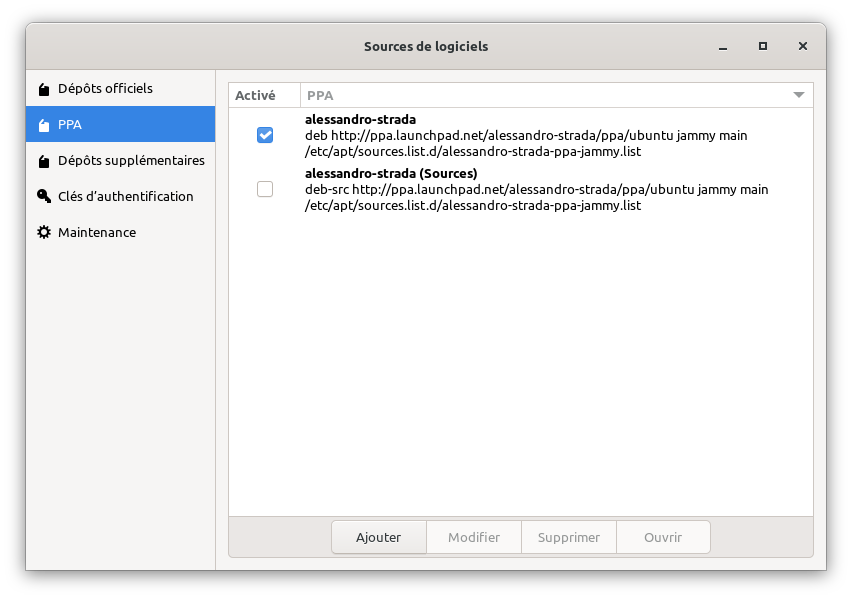
Et je pense que tu as une piste comme montré dans cette copie de fenêtre.

Image

Re: mintupgrade

Posté : mar. 6 déc. 2022 13:36
par Yvon58
cyrille a écrit : mar. 6 déc. 2022 13:14 Avant d'upgrader vers la nouvelle version il faut que tu nettoies tes sources.list des ppa que tu as mis

Donne nous le retour de

Code : Tout sélectionner

find /etc/apt -type f -name '*.list' -exec bash -c 'echo -e "\n$1"; nl -ba "$1"' _ '{}' \;
qu'on te dise quel fichier supprimer

Code : Tout sélectionner

yvon@HP-All-in-One-Mint:~$ find /etc/apt -type f -name '*.list' -exec bash -c 'echo -e "\n$1"; nl -ba "$1"' _ '{}' \;

/etc/apt/sources.list.d/official-package-repositories.list
     1	deb http://packages.linuxmint.com tricia main upstream import backport 
     2	
     3	deb http://archive.ubuntu.com/ubuntu bionic main restricted universe multiverse
     4	deb http://archive.ubuntu.com/ubuntu bionic-updates main restricted universe multiverse
     5	deb http://archive.ubuntu.com/ubuntu bionic-backports main restricted universe multiverse
     6	
     7	deb http://security.ubuntu.com/ubuntu/ bionic-security main restricted universe multiverse
     8	deb http://archive.canonical.com/ubuntu/ bionic partner

/etc/apt/sources.list.d/graphics-drivers-ppa-bionic.list
     1	deb http://ppa.launchpad.net/graphics-drivers/ppa/ubuntu bionic main
     2	# deb-src http://ppa.launchpad.net/graphics-drivers/ppa/ubuntu bionic main

/etc/apt/sources.list
     1	#deb cdrom:[Linux Mint 19.3 _Tricia_ - Release amd64 20191213]/ bionic contrib main non-free
yvon@HP-All-in-One-Mint:~$
[Code]