Page 1 sur 2

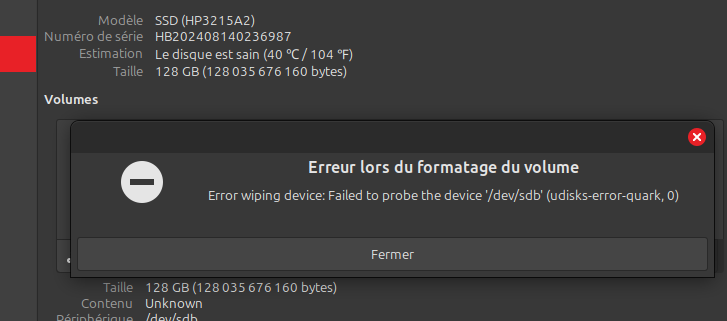
Perte Partition - Error Quark-0 - ECHEC réparation impossible

Posté : dim. 27 juil. 2025 18:15
par Le Terrien
Bonjour les docteurs

Je pense avoir perdu la partition de ce DD suite à une mauvaise extinction du Portable par ma fille
Le disq est signalé comme sain, mais elle n'y a plus accès
Mes connaissances limitées et mes recherches m’ont amené à faire un fsck dont je ne capte pas le résultat ni comment remettre une partition sur ce disk qui ne semble pas perdu. Comme je n'arrive à rien, j'ai décidé de le formater afin de récréer une nouvelle partoche sur ce DD qui ne comportait rien d'important
Sauf que ...

Image

Re: Perte Partition - Error Quark-0

Posté : dim. 27 juil. 2025 19:33
par Le Terrien
Merci

Là je l'ai mis en externe pour travailler dessus, mais il provient d'un PC portable. Donc en interne
Je n'ai pas tout copié, il y en avait des kilomètres ...

sudo dmesg

Code : Tout sélectionner

 1601.357697] ata5.00: status: { DRDY ERR }
[ 1601.357701] ata5.00: error: { ABRT }
[ 1601.402221] ata5.00: configured for UDMA/33
[ 1601.402236] sd 4:0:0:0: [sdb] tag#31 FAILED Result: hostbyte=DID_OK driverbyte=DRIVER_OK cmd_age=0s
[ 1601.402240] sd 4:0:0:0: [sdb] tag#31 Sense Key : Illegal Request [current] 
[ 1601.402243] sd 4:0:0:0: [sdb] tag#31 Add. Sense: Unaligned write command
[ 1601.402246] sd 4:0:0:0: [sdb] tag#31 CDB: Read(10) 28 00 00 00 00 00 00 00 08 00
[ 1601.402248] I/O error, dev sdb, sector 0 op 0x0:(READ) flags 0x80700 phys_seg 1 prio class 0
[ 1601.402262] ata5: EH complete
[ 1601.420673] ata5.00: exception Emask 0x0 SAct 0x0 SErr 0x0 action 0x0
[ 1601.420681] ata5.00: irq_stat 0x40000001
[ 1601.420684] ata5.00: failed command: READ DMA
[ 1601.420687] ata5.00: cmd c8/00:08:00:00:00/00:00:00:00:00/e0 tag 11 dma 4096 in
                        res 51/04:08:00:00:00/00:00:00:00:00/e0 Emask 0x1 (device error)
[ 1601.420694] ata5.00: status: { DRDY ERR }
[ 1601.420696] ata5.00: error: { ABRT }
[ 1601.454098] ata5.00: configured for UDMA/33
[ 1601.454125] ata5: EH complete
[ 1601.465679] ata5.00: exception Emask 0x0 SAct 0x0 SErr 0x0 action 0x0
[ 1601.465685] ata5.00: irq_stat 0x40000001
[ 1601.465687] ata5.00: failed command: READ DMA
[ 1601.465689] ata5.00: cmd c8/00:08:00:00:00/00:00:00:00:00/e0 tag 27 dma 4096 in
                        res 51/04:08:00:00:00/00:00:00:00:00/e0 Emask 0x1 (device error)
[ 1601.465696] ata5.00: status: { DRDY ERR }
[ 1601.465698] ata5.00: error: { ABRT }
[ 1601.499975] ata5.00: configured for UDMA/33
[ 1601.500001] ata5: EH complete
[ 1601.511667] ata5.00: exception Emask 0x0 SAct 0x0 SErr 0x0 action 0x0
[ 1601.511674] ata5.00: irq_stat 0x40000001
[ 1601.511679] ata5.00: failed command: READ DMA
[ 1601.511682] ata5.00: cmd c8/00:08:00:00:00/00:00:00:00:00/e0 tag 29 dma 4096 in
                        res 51/04:08:00:00:00/00:00:00:00:00/e0 Emask 0x1 (device error)
[ 1601.511694] ata5.00: status: { DRDY ERR }
[ 1601.511698] ata5.00: error: { ABRT }
[ 1601.545440] ata5.00: configured for UDMA/33
[ 1601.545453] ata5: EH complete
[ 1601.557662] ata5.00: exception Emask 0x0 SAct 0x0 SErr 0x0 action 0x0
[ 1601.557669] ata5.00: irq_stat 0x40000001
[ 1601.557672] ata5.00: failed command: READ DMA
[ 1601.557675] ata5.00: cmd c8/00:08:00:00:00/00:00:00:00:00/e0 tag 0 dma 4096 in
                        res 51/04:08:00:00:00/00:00:00:00:00/e0 Emask 0x1 (device error)
[ 1601.557687] ata5.00: status: { DRDY ERR }
[ 1601.557690] ata5.00: error: { ABRT }
[ 1601.591289] ata5.00: configured for UDMA/33
[ 1601.591307] ata5: EH complete
[ 1601.602686] ata5.00: exception Emask 0x0 SAct 0x0 SErr 0x0 action 0x0
[ 1601.602697] ata5.00: irq_stat 0x40000001
[ 1601.602701] ata5.00: failed command: READ DMA
[ 1601.602705] ata5.00: cmd c8/00:08:00:00:00/00:00:00:00:00/e0 tag 2 dma 4096 in
                        res 51/04:08:00:00:00/00:00:00:00:00/e0 Emask 0x1 (device error)
[ 1601.602717] ata5.00: status: { DRDY ERR }
[ 1601.602721] ata5.00: error: { ABRT }
[ 1601.636212] ata5.00: configured for UDMA/33
[ 1601.636230] ata5: EH complete
[ 1601.647804] ata5.00: exception Emask 0x0 SAct 0x0 SErr 0x0 action 0x0
[ 1601.647815] ata5.00: irq_stat 0x40000001
[ 1601.647820] ata5.00: failed command: READ DMA
[ 1601.647823] ata5.00: cmd c8/00:08:00:00:00/00:00:00:00:00/e0 tag 4 dma 4096 in
                        res 51/04:08:00:00:00/00:00:00:00:00/e0 Emask 0x1 (device error)
[ 1601.647835] ata5.00: status: { DRDY ERR }
[ 1601.647839] ata5.00: error: { ABRT }
[ 1601.682129] ata5.00: configured for UDMA/33
[ 1601.682150] sd 4:0:0:0: [sdb] tag#4 FAILED Result: hostbyte=DID_OK driverbyte=DRIVER_OK cmd_age=0s
[ 1601.682157] sd 4:0:0:0: [sdb] tag#4 Sense Key : Illegal Request [current] 
[ 1601.682162] sd 4:0:0:0: [sdb] tag#4 Add. Sense: Unaligned write command
[ 1601.682167] sd 4:0:0:0: [sdb] tag#4 CDB: Read(10) 28 00 00 00 00 00 00 00 08 00
[ 1601.682170] I/O error, dev sdb, sector 0 op 0x0:(READ) flags 0x0 phys_seg 1 prio class 0
[ 1601.682179] Buffer I/O error on dev sdb, logical block 0, async page read
[ 1601.682194] ata5: EH complete
[ 2621.375640] ata5.00: exception Emask 0x0 SAct 0x0 SErr 0x0 action 0x0
[ 2621.375648] ata5.00: irq_stat 0x40000001
[ 2621.375651] ata5.00: failed command: READ DMA
[ 2621.375653] ata5.00: cmd c8/00:08:00:00:00/00:00:00:00:00/e0 tag 14 dma 4096 in
                        res 51/04:08:00:00:00/00:00:00:00:00/e0 Emask 0x1 (device error)
[ 2621.375659] ata5.00: status: { DRDY ERR }
[ 2621.375660] ata5.00: error: { ABRT }
[ 2621.420558] ata5.00: configured for UDMA/33
[ 2621.420584] sd 4:0:0:0: [sdb] tag#14 FAILED Result: hostbyte=DID_OK driverbyte=DRIVER_OK cmd_age=0s
[ 2621.420588] sd 4:0:0:0: [sdb] tag#14 Sense Key : Illegal Request [current] 
[ 2621.420591] sd 4:0:0:0: [sdb] tag#14 Add. Sense: Unaligned write command
[ 2621.420593] sd 4:0:0:0: [sdb] tag#14 CDB: Read(10) 28 00 00 00 00 00 00 00 08 00
[ 2621.420595] I/O error, dev sdb, sector 0 op 0x0:(READ) flags 0x80700 phys_seg 1 prio class 0
[ 2621.420609] ata5: EH complete
[ 2621.434602] ata5.00: exception Emask 0x0 SAct 0x0 SErr 0x0 action 0x0
[ 2621.434610] ata5.00: irq_stat 0x40000001
[ 2621.434613] ata5.00: failed command: READ DMA
[ 2621.434614] ata5.00: cmd c8/00:08:00:00:00/00:00:00:00:00/e0 tag 18 dma 4096 in
                        res 51/04:08:00:00:00/00:00:00:00:00/e0 Emask 0x1 (device error)
[ 2621.434620] ata5.00: status: { DRDY ERR }
[ 2621.434622] ata5.00: error: { ABRT }
[ 2621.469189] ata5.00: configured for UDMA/33
[ 2621.469205] ata5: EH complete
[ 2621.483587] ata5.00: exception Emask 0x0 SAct 0x0 SErr 0x0 action 0x0
[ 2621.483594] ata5.00: irq_stat 0x40000001
[ 2621.483597] ata5.00: failed command: READ DMA
[ 2621.483599] ata5.00: cmd c8/00:08:00:00:00/00:00:00:00:00/e0 tag 21 dma 4096 in
                        res 51/04:08:00:00:00/00:00:00:00:00/e0 Emask 0x1 (device error)
[ 2621.483605] ata5.00: status: { DRDY ERR }
[ 2621.483607] ata5.00: error: { ABRT }
[ 2621.517384] ata5.00: configured for UDMA/33
[ 2621.517408] ata5: EH complete
[ 2621.528586] ata5.00: exception Emask 0x0 SAct 0x0 SErr 0x0 action 0x0
[ 2621.528597] ata5.00: irq_stat 0x40000001
[ 2621.528603] ata5.00: failed command: READ DMA
[ 2621.528606] ata5.00: cmd c8/00:08:00:00:00/00:00:00:00:00/e0 tag 20 dma 4096 in
                        res 51/04:08:00:00:00/00:00:00:00:00/e0 Emask 0x1 (device error)
[ 2621.528620] ata5.00: status: { DRDY ERR }
[ 2621.528624] ata5.00: error: { ABRT }
[ 2621.562509] ata5.00: configured for UDMA/33
[ 2621.562532] ata5: EH complete
[ 2621.574589] ata5.00: exception Emask 0x0 SAct 0x0 SErr 0x0 action 0x0
[ 2621.574602] ata5.00: irq_stat 0x40000001
[ 2621.574608] ata5.00: failed command: READ DMA
[ 2621.574612] ata5.00: cmd c8/00:08:00:00:00/00:00:00:00:00/e0 tag 23 dma 4096 in
                        res 51/04:08:00:00:00/00:00:00:00:00/e0 Emask 0x1 (device error)
[ 2621.574626] ata5.00: status: { DRDY ERR }
[ 2621.574630] ata5.00: error: { ABRT }
[ 2621.608104] ata5.00: configured for UDMA/33
[ 2621.608128] ata5: EH complete
[ 2621.623590] ata5.00: exception Emask 0x0 SAct 0x0 SErr 0x0 action 0x0
[ 2621.623599] ata5.00: irq_stat 0x40000001
[ 2621.623604] ata5.00: failed command: READ DMA
[ 2621.623607] ata5.00: cmd c8/00:08:00:00:00/00:00:00:00:00/e0 tag 27 dma 4096 in
                        res 51/04:08:00:00:00/00:00:00:00:00/e0 Emask 0x1 (device error)
[ 2621.623620] ata5.00: status: { DRDY ERR }
[ 2621.623623] ata5.00: error: { ABRT }
[ 2621.658351] ata5.00: configured for UDMA/33
[ 2621.658375] ata5: EH complete
[ 2621.669590] ata5.00: exception Emask 0x0 SAct 0x0 SErr 0x0 action 0x0
[ 2621.669602] ata5.00: irq_stat 0x40000001
[ 2621.669607] ata5.00: failed command: READ DMA
[ 2621.669611] ata5.00: cmd c8/00:08:00:00:00/00:00:00:00:00/e0 tag 30 dma 4096 in
Et pour sudo dmesg | egrep 'error|fail|warn'
Je n'ai pas tout copié non plus c'était en boucle

Code : Tout sélectionner

 1601.357701] ata5.00: error: { ABRT }
[ 1601.402248] I/O error, dev sdb, sector 0 op 0x0:(READ) flags 0x80700 phys_seg 1 prio class 0
[ 1601.420684] ata5.00: failed command: READ DMA
                        res 51/04:08:00:00:00/00:00:00:00:00/e0 Emask 0x1 (device error)
[ 1601.420696] ata5.00: error: { ABRT }
[ 1601.465687] ata5.00: failed command: READ DMA
                        res 51/04:08:00:00:00/00:00:00:00:00/e0 Emask 0x1 (device error)
[ 1601.465698] ata5.00: error: { ABRT }
[ 1601.511679] ata5.00: failed command: READ DMA
                        res 51/04:08:00:00:00/00:00:00:00:00/e0 Emask 0x1 (device error)
[ 1601.511698] ata5.00: error: { ABRT }
[ 1601.557672] ata5.00: failed command: READ DMA
                        res 51/04:08:00:00:00/00:00:00:00:00/e0 Emask 0x1 (device error)
[ 1601.557690] ata5.00: error: { ABRT }
[ 1601.602701] ata5.00: failed command: READ DMA
                        res 51/04:08:00:00:00/00:00:00:00:00/e0 Emask 0x1 (device error)
[ 1601.602721] ata5.00: error: { ABRT }
[ 1601.647820] ata5.00: failed command: READ DMA
                        res 51/04:08:00:00:00/00:00:00:00:00/e0 Emask 0x1 (device error)
[ 1601.647839] ata5.00: error: { ABRT }
[ 1601.682170] I/O error, dev sdb, sector 0 op 0x0:(READ) flags 0x0 phys_seg 1 prio class 0
[ 1601.682179] Buffer I/O error on dev sdb, logical block 0, async page read
[ 2621.375651] ata5.00: failed command: READ DMA
                        res 51/04:08:00:00:00/00:00:00:00:00/e0 Emask 0x1 (device error)
[ 2621.375660] ata5.00: error: { ABRT }
[ 2621.420595] I/O error, dev sdb, sector 0 op 0x0:(READ) flags 0x80700 phys_seg 1 prio class 0
[ 2621.434613] ata5.00: failed command: READ DMA
                        res 51/04:08:00:00:00/00:00:00:00:00/e0 Emask 0x1 (device error)
[ 2621.434622] ata5.00: error: { ABRT }
[ 2621.483597] ata5.00: failed command: READ DMA
                        res 51/04:08:00:00:00/00:00:00:00:00/e0 Emask 0x1 (device error)
[ 2621.483607] ata5.00: error: { ABRT }
[ 2621.528603] ata5.00: failed command: READ DMA
                        res 51/04:08:00:00:00/00:00:00:00:00/e0 Emask 0x1 (device error)
[ 2621.528624] ata5.00: error: { ABRT }
[ 2621.574608] ata5.00: failed command: READ DMA
                        res 51/04:08:00:00:00/00:00:00:00:00/e0 Emask 0x1 (device error)
[ 2621.574630] ata5.00: error: { ABRT }
[ 2621.623604] ata5.00: failed command: READ DMA
                        res 51/04:08:00:00:00/00:00:00:00:00/e0 Emask 0x1 (device error)
[ 2621.623623] ata5.00: error: { ABRT }
[ 2621.669607] ata5.00: failed command: READ DMA
                        res 51/04:08:00:00:00/00:00:00:00:00/e0 Emask 0x1 (device error)
[ 2621.669627] ata5.00: error: { ABRT }
[ 2621.703987] I/O error, dev sdb, sector 0 op 0x0:(READ) flags 0x0 phys_seg 1 prio class 0
[ 2621.703996] Buffer I/O error on dev sdb, logical block 0, async page read
[ 2621.713620] ata5.00: failed command: READ DMA
                        res 51/04:08:a8:c2:e7/00:00:00:00:00/ee Emask 0x1 (device error)
[ 2621.713642] ata5.00: error: { ABRT }
[ 2621.747193] I/O error, dev sdb, sector 250069672 op 0x0:(READ) flags 0x80700 phys_seg 1 prio class 0
[ 2621.758599] ata5.00: failed command: READ DMA
                        res 51/04:08:a8:c2:e7/00:00:00:00:00/ee Emask 0x1 (device error)
[ 2621.758618] ata5.00: error: { ABRT }
[ 2621.805628] ata5.00: failed command: READ DMA
                        res 51/04:08:a8:c2:e7/00:00:00:00:00/ee Emask 0x1 (device error)
[ 2621.805648] ata5.00: error: { ABRT }
[ 2621.855629] ata5.00: failed command: READ DMA
                        res 51/04:08:a8:c2:e7/00:00:00:00:00/ee Emask 0x1 (device error)
[ 2621.855649] ata5.00: error: { ABRT }
[ 2621.900608] ata5.00: failed command: READ DMA
                        res 51/04:08:a8:c2:e7/00:00:00:00:00/ee Emask 0x1 (device error)
[ 2621.900631] ata5.00: error: { ABRT }
[ 2621.945619] ata5.00: failed command: READ DMA
                        res 51/04:08:a8:c2:e7/00:00:00:00:00/ee Emask 0x1 (device error)

Re: Perte Partition - Error Quark-0

Posté : dim. 27 juil. 2025 19:42
par Le Terrien
Voilà ce que ça donne

Code : Tout sélectionner

Utilisation : fsck.ext2 [-panyrcdfktvDFV] [-b super-bloc] [-B taille-de-bloc]
		[-l|-L fichiers-des-blocs-défectueux] [-C fd] [-j journal-externe]
		[-E options-étendues] périphérique

Aide d'urgence :
 -p                   Réparation automatique (sans question)
 -n                   N'appliquer aucun changement au système de fichiers
 -y                   Supposer « oui » pour toutes les questions
 -c                   Vérifier la présence de blocs défectueux et les
                      ajouter à la liste des blocs défectueux
 -f                   Forcer la vérification même si le système de fichiers
                      est marqué propre
 -v                   Travailler en mode bavard
 -b super-bloc        Utiliser un bloc alternatif pour le superbloc
 -B taille-de-bloc    Forcer la taille des blocs lors de la recherche du
                      superbloc
 -j journal-externe   Définir la localisation du journal externe
 -l fichier-des-blocs-erronés
                      Ajouter à la liste des blocs défectueux
 -L fichier-des-blocs-erronés
                      Définir la liste des blocs défectueux
 -z fichier-d-annulation
                      Créer un fichier d'annulation

Re: Perte Partition - Error Quark-0

Posté : dim. 27 juil. 2025 19:45
par Le Terrien

Code : Tout sélectionner

sudo fsck - y /dev/sdb

Re: Perte Partition - Error Quark-0

Posté : dim. 27 juil. 2025 19:54
par Le Terrien
Ok mais comment fait-on ça puisque la partition est flinguée
Elle n’apparaît pas
Seule la partition du DD de ma machine apparaît
sdb n’apparaît pas. C'est à mon avis ça qu'il faudrait reconstruire
Le disq apparaissant comme sain, ça devrait être possible, mais comment ?
Disque /dev/sda : 1,82 TiB, 2000398934016 octets, 3907029168 secteurs
Disk model: CT2000BX500SSD1
Unités : secteur de 1 × 512 = 512 octets
Taille de secteur (logique / physique) : 512 octets / 512 octets
taille d'E/S (minimale / optimale) : 512 octets / 512 octets
Type d'étiquette de disque : gpt
Identifiant de disque : 8748D974-F3A5-11EC-A21E-7A161B0B0974

Périphérique Début Fin Secteurs Taille Type
/dev/sda1 2048 976895 974848 476M Système EFI
/dev/sda2 976896 16601087 15624192 7,5G Partition d'échange Linux
/dev/sda3 16601088 407226367 390625280 186,3G Système de fichiers Linux
/dev/sda4 407226368 3907028991 3499802624 1,6T Système de fichiers Linux

Re: Perte Partition - Error Quark-0

Posté : dim. 27 juil. 2025 20:22
par Le Terrien
Sur le pc portable en direct
Sur ma tour avec un câble rouge
J'y ai pensé, je l'ai remplacé. Même problème
1+0 enregistrements lus
1+0 enregistrements écrits
1048576 octets (1,0 MB, 1,0 MiB) copiés, 3,93503 s, 266 kB/s

Re: Perte Partition - Error Quark-0

Posté : dim. 27 juil. 2025 20:54
par Le Terrien
Super merci
Je sais que j'ai déjà smartcontrol sur ma machine, par contre je ne sais pas trop comment analyser la somme d'infos

J'ai donc lancé un smartctl -i /dev/sdb

Code : Tout sélectionner

1+0 enregistrements lus
1+0 enregistrements écrits
1048576 octets (1,0 MB, 1,0 MiB) copiés, 3,93503 s, 266 kB/s
claude@claude-B450M-DS3H-V2:~$ sudo smartctl -i /dev/sdb
[sudo] Mot de passe de claude :     
smartctl 7.4 2023-08-01 r5530 [x86_64-linux-6.8.0-63-generic] (local build)
Copyright (C) 2002-23, Bruce Allen, Christian Franke, www.smartmontools.org

=== START OF INFORMATION SECTION ===
Device Model:     SSD
Serial Number:    HB202408140236987
LU WWN Device Id: 0 000000 000000000
Firmware Version: HP3215A2
User Capacity:    128 035 676 160 bytes [128 GB]
Sector Size:      512 bytes logical/physical
Rotation Rate:    Solid State Device
Form Factor:      2.5 inches
TRIM Command:     Available
Device is:        Not in smartctl database 7.3/5528
ATA Version is:   ACS-4 T13/BSR INCITS 529 revision 5
SATA Version is:  SATA 3.2, 6.0 Gb/s (current: 1.5 Gb/s)
Local Time is:    Sun Jul 27 20:51:34 2025 CEST
SMART support is: Available - device has SMART capability.
SMART support is: Enabled
Puis un

Code : Tout sélectionner

/usr/sbin/smartctl -a /dev/sdb
smartctl 7.4 2023-08-01 r5530 [x86_64-linux-6.8.0-63-generic] (local build)
Copyright (C) 2002-23, Bruce Allen, Christian Franke, www.smartmontools.org

Smartctl open device: /dev/sdb failed: Permission denied
Et là patatra la ligne que tu désigne comme la plus importante n’apparaît pas
Dois je comprendre que mon DD apparaissant comme sain est malgré tout HS ?

Code : Tout sélectionner

SMART overall-health self-assessment test result: PASSED
AHhhhhhhhhhhhhhh !!!

Je viens de voir passer un SMART overall-health self-assessment test result: PASSED

Code : Tout sélectionner

sudo smartctl -s on -a /dev/sdb
[sudo]
smartctl 7.4 2023-08-01 r5530 [x86_64-linux-6.8.0-63-generic] (local build)
Copyright (C) 2002-23, Bruce Allen, Christian Franke, www.smartmontools.org

=== START OF INFORMATION SECTION ===
Device Model:     SSD
Serial Number:    HB202408140236987
LU WWN Device Id: 0 000000 000000000
Firmware Version: HP3215A2
User Capacity:    128 035 676 160 bytes [128 GB]
Sector Size:      512 bytes logical/physical
Rotation Rate:    Solid State Device
Form Factor:      2.5 inches
TRIM Command:     Available
Device is:        Not in smartctl database 7.3/5528
ATA Version is:   ACS-4 T13/BSR INCITS 529 revision 5
SATA Version is:  SATA 3.2, 6.0 Gb/s (current: 1.5 Gb/s)
Local Time is:    Sun Jul 27 21:06:11 2025 CEST
SMART support is: Available - device has SMART capability.
SMART support is: Enabled

=== START OF ENABLE/DISABLE COMMANDS SECTION ===
SMART Enabled.

=== START OF READ SMART DATA SECTION ===
[b]SMART overall-health self-assessment test result: PASSED[/b]

General SMART Values:
Offline data collection status:  (0x02)	Offline data collection activity
					was completed without error.
					Auto Offline Data Collection: Disabled.
Self-test execution status:      (   0)	The previous self-test routine completed
					without error or no self-test has ever 
					been run.
Total time to complete Offline 
data collection: 		(   21) seconds.
Offline data collection
capabilities: 			 (0x5d) SMART execute Offline immediate.
					No Auto Offline data collection support.
					Abort Offline collection upon new
					command.
					Offline surface scan supported.
					Self-test supported.
					No Conveyance Self-test supported.
					Selective Self-test supported.
SMART capabilities:            (0x0002)	Does not save SMART data before
					entering power-saving mode.
					Supports SMART auto save timer.
Error logging capability:        (0x01)	Error logging supported.
					General Purpose Logging supported.
Short self-test routine 
recommended polling time: 	 (   2) minutes.
Extended self-test routine
recommended polling time: 	 (   4) minutes.

SMART Attributes Data Structure revision number: 1
Vendor Specific SMART Attributes with Thresholds:
ID# ATTRIBUTE_NAME          FLAG     VALUE WORST THRESH TYPE      UPDATED  WHEN_FAILED RAW_VALUE
  1 Raw_Read_Error_Rate     0x0032   100   100   050    Old_age   Always       -       0
  5 Reallocated_Sector_Ct   0x0032   100   100   050    Old_age   Always       -       0
  9 Power_On_Hours          0x0032   100   100   050    Old_age   Always       -       334
 12 Power_Cycle_Count       0x0032   100   100   050    Old_age   Always       -       301
160 Unknown_Attribute       0x0032   100   100   050    Old_age   Always       -       0
161 Unknown_Attribute       0x0032   100   100   050    Old_age   Always       -       356
163 Unknown_Attribute       0x0032   100   100   050    Old_age   Always       -       0
164 Unknown_Attribute       0x0032   100   100   050    Old_age   Always       -       4
165 Unknown_Attribute       0x0032   100   100   050    Old_age   Always       -       14
166 Unknown_Attribute       0x0032   100   100   050    Old_age   Always       -       1
167 Unknown_Attribute       0x0032   100   100   050    Old_age   Always       -       5
168 Unknown_Attribute       0x0032   100   100   050    Old_age   Always       -       0
169 Unknown_Attribute       0x0032   100   100   050    Old_age   Always       -       100
175 Program_Fail_Count_Chip 0x0032   100   100   050    Old_age   Always       -       35258393
176 Erase_Fail_Count_Chip   0x0032   100   100   050    Old_age   Always       -       5099
177 Wear_Leveling_Count     0x0032   100   100   050    Old_age   Always       -       154057
178 Used_Rsvd_Blk_Cnt_Chip  0x0032   100   100   050    Old_age   Always       -       3
181 Program_Fail_Cnt_Total  0x0032   100   100   050    Old_age   Always       -       0
182 Erase_Fail_Count_Total  0x0032   100   100   050    Old_age   Always       -       0
192 Power-Off_Retract_Count 0x0032   100   100   050    Old_age   Always       -       7
194 Temperature_Celsius     0x0032   100   100   050    Old_age   Always       -       40
195 Hardware_ECC_Recovered  0x0032   100   100   050    Old_age   Always       -       0
196 Reallocated_Event_Count 0x0032   100   100   050    Old_age   Always       -       0
197 Current_Pending_Sector  0x0032   100   100   050    Old_age   Always       -       0
198 Offline_Uncorrectable   0x0032   100   100   050    Old_age   Always       -       0
199 UDMA_CRC_Error_Count    0x0032   100   100   050    Old_age   Always       -       0
232 Available_Reservd_Space 0x0032   100   100   050    Old_age   Always       -       100
241 Total_LBAs_Written      0x0032   100   100   050    Old_age   Always       -       7676
242 Total_LBAs_Read         0x0032   100   100   050    Old_age   Always       -       5166

SMART Error Log Version: 0
No Errors Logged

SMART Self-test log structure revision number 1
Num  Test_Description    Status                  Remaining  LifeTime(hours)  LBA_of_first_error
# 1  Offline             Completed without error       00%       334         -
# 2  Offline             Self-test routine in progress 10%       334         -
# 3  Offline             Self-test routine in progress 10%       334         -
# 4  Offline             Self-test routine in progress 10%       334         -
# 5  Offline             Self-test routine in progress 10%       334         -
# 6  Offline             Self-test routine in progress 10%       334         -
# 7  Offline             Self-test routine in progress 10%       334         -
# 8  Offline             Self-test routine in progress 10%       334         -
# 9  Offline             Self-test routine in progress 10%       334         -
#10  Offline             Self-test routine in progress 10%       334         -
#11  Offline             Self-test routine in progress 10%       334         -
#12  Offline             Self-test routine in progress 10%       334         -
#13  Offline             Self-test routine in progress 10%       334         -
#14  Offline             Self-test routine in progress 10%       334         -
#15  Offline             Self-test routine in progress 10%       334         -
#16  Offline             Self-test routine in progress 10%       334         -
#17  Offline             Self-test routine in progress 10%       334         -
#18  Offline             Self-test routine in progress 10%       334         -
#19  Offline             Self-test routine in progress 10%       334         -
#20  Offline             Self-test routine in progress 10%       334         -
#21  Offline             Self-test routine in progress 10%       334         -

SMART Selective self-test log data structure revision number 0
Note: revision number not 1 implies that no selective self-test has ever been run
 SPAN  MIN_LBA  MAX_LBA  CURRENT_TEST_STATUS
    1        0        0  Not_testing
    2        0        0  Not_testing
    3        0        0  Not_testing
    4        0        0  Not_testing
    5        0        0  Not_testing
Selective self-test flags (0x0):
  After scanning selected spans, do NOT read-scan remainder of disk.
If Selective self-test is pending on power-up, resume after 0 minute delay.

The above only provides legacy SMART information - try 'smartctl -x' for more
Ca me parait une bonne chose, mais à partir de là je ne sais plus que faire
Je verrai demain, là il faut que je stoppe et toi aussi j'imagine
Merci
Re: Perte Partition - Error Quark-0

Posté : lun. 28 juil. 2025 16:51
par Le Terrien
Je reviens un peu à la charge, puisque je viens de voir passer un
SMART overall-health self-assessment test result: PASSED

après avoir fait ceci, je me dis que c'est plutôt une bonne nouvelle
Par contre je ne sais pas que faire pour la suite

Code : Tout sélectionner

udo smartctl -s on -a /dev/sdb
[sudo]
smartctl 7.4 2023-08-01 r5530 [x86_64-linux-6.8.0-63-generic] (local build)
Copyright (C) 2002-23, Bruce Allen, Christian Franke, www.smartmontools.org

=== START OF INFORMATION SECTION ===
Device Model:     SSD
Serial Number:    HB202408140236987
LU WWN Device Id: 0 000000 000000000
Firmware Version: HP3215A2
User Capacity:    128 035 676 160 bytes [128 GB]
Sector Size:      512 bytes logical/physical
Rotation Rate:    Solid State Device
Form Factor:      2.5 inches
TRIM Command:     Available
Device is:        Not in smartctl database 7.3/5528
ATA Version is:   ACS-4 T13/BSR INCITS 529 revision 5
SATA Version is:  SATA 3.2, 6.0 Gb/s (current: 1.5 Gb/s)
Local Time is:    Sun Jul 27 21:06:11 2025 CEST
SMART support is: Available - device has SMART capability.
SMART support is: Enabled

=== START OF ENABLE/DISABLE COMMANDS SECTION ===
SMART Enabled.

=== START OF READ SMART DATA SECTION ===
[b]SMART overall-health self-assessment test result: PASSED[/b]

General SMART Values:
Offline data collection status:  (0x02)	Offline data collection activity
					was completed without error.
					Auto Offline Data Collection: Disabled.
Self-test execution status:      (   0)	The previous self-test routine completed
					without error or no self-test has ever 
					been run.
Total time to complete Offline 
data collection: 		(   21) seconds.
Offline data collection
capabilities: 			 (0x5d) SMART execute Offline immediate.
					No Auto Offline data collection support.
					Abort Offline collection upon new
					command.
					Offline surface scan supported.
					Self-test supported.
					No Conveyance Self-test supported.
					Selective Self-test supported.
SMART capabilities:            (0x0002)	Does not save SMART data before
					entering power-saving mode.
					Supports SMART auto save timer.
Error logging capability:        (0x01)	Error logging supported.
					General Purpose Logging supported.
Short self-test routine 
recommended polling time: 	 (   2) minutes.
Extended self-test routine
recommended polling time: 	 (   4) minutes.

SMART Attributes Data Structure revision number: 1
Vendor Specific SMART Attributes with Thresholds:
ID# ATTRIBUTE_NAME          FLAG     VALUE WORST THRESH TYPE      UPDATED  WHEN_FAILED RAW_VALUE
  1 Raw_Read_Error_Rate     0x0032   100   100   050    Old_age   Always       -       0
  5 Reallocated_Sector_Ct   0x0032   100   100   050    Old_age   Always       -       0
  9 Power_On_Hours          0x0032   100   100   050    Old_age   Always       -       334
 12 Power_Cycle_Count       0x0032   100   100   050    Old_age   Always       -       301
160 Unknown_Attribute       0x0032   100   100   050    Old_age   Always       -       0
161 Unknown_Attribute       0x0032   100   100   050    Old_age   Always       -       356
163 Unknown_Attribute       0x0032   100   100   050    Old_age   Always       -       0
164 Unknown_Attribute       0x0032   100   100   050    Old_age   Always       -       4
165 Unknown_Attribute       0x0032   100   100   050    Old_age   Always       -       14
166 Unknown_Attribute       0x0032   100   100   050    Old_age   Always       -       1
167 Unknown_Attribute       0x0032   100   100   050    Old_age   Always       -       5
168 Unknown_Attribute       0x0032   100   100   050    Old_age   Always       -       0
169 Unknown_Attribute       0x0032   100   100   050    Old_age   Always       -       100
175 Program_Fail_Count_Chip 0x0032   100   100   050    Old_age   Always       -       35258393
176 Erase_Fail_Count_Chip   0x0032   100   100   050    Old_age   Always       -       5099
177 Wear_Leveling_Count     0x0032   100   100   050    Old_age   Always       -       154057
178 Used_Rsvd_Blk_Cnt_Chip  0x0032   100   100   050    Old_age   Always       -       3
181 Program_Fail_Cnt_Total  0x0032   100   100   050    Old_age   Always       -       0
182 Erase_Fail_Count_Total  0x0032   100   100   050    Old_age   Always       -       0
192 Power-Off_Retract_Count 0x0032   100   100   050    Old_age   Always       -       7
194 Temperature_Celsius     0x0032   100   100   050    Old_age   Always       -       40
195 Hardware_ECC_Recovered  0x0032   100   100   050    Old_age   Always       -       0
196 Reallocated_Event_Count 0x0032   100   100   050    Old_age   Always       -       0
197 Current_Pending_Sector  0x0032   100   100   050    Old_age   Always       -       0
198 Offline_Uncorrectable   0x0032   100   100   050    Old_age   Always       -       0
199 UDMA_CRC_Error_Count    0x0032   100   100   050    Old_age   Always       -       0
232 Available_Reservd_Space 0x0032   100   100   050    Old_age   Always       -       100
241 Total_LBAs_Written      0x0032   100   100   050    Old_age   Always       -       7676
242 Total_LBAs_Read         0x0032   100   100   050    Old_age   Always       -       5166

SMART Error Log Version: 0
No Errors Logged

SMART Self-test log structure revision number 1
Num  Test_Description    Status                  Remaining  LifeTime(hours)  LBA_of_first_error
# 1  Offline             Completed without error       00%       334         -
# 2  Offline             Self-test routine in progress 10%       334         -
# 3  Offline             Self-test routine in progress 10%       334         -
# 4  Offline             Self-test routine in progress 10%       334         -
# 5  Offline             Self-test routine in progress 10%       334         -
# 6  Offline             Self-test routine in progress 10%       334         -
# 7  Offline             Self-test routine in progress 10%       334         -
# 8  Offline             Self-test routine in progress 10%       334         -
# 9  Offline             Self-test routine in progress 10%       334         -
#10  Offline             Self-test routine in progress 10%       334         -
#11  Offline             Self-test routine in progress 10%       334         -
#12  Offline             Self-test routine in progress 10%       334         -
#13  Offline             Self-test routine in progress 10%       334         -
#14  Offline             Self-test routine in progress 10%       334         -
#15  Offline             Self-test routine in progress 10%       334         -
#16  Offline             Self-test routine in progress 10%       334         -
#17  Offline             Self-test routine in progress 10%       334         -
#18  Offline             Self-test routine in progress 10%       334         -
#19  Offline             Self-test routine in progress 10%       334         -
#20  Offline             Self-test routine in progress 10%       334         -
#21  Offline             Self-test routine in progress 10%       334         -

SMART Selective self-test log data structure revision number 0
Note: revision number not 1 implies that no selective self-test has ever been run
 SPAN  MIN_LBA  MAX_LBA  CURRENT_TEST_STATUS
    1        0        0  Not_testing
    2        0        0  Not_testing
    3        0        0  Not_testing
    4        0        0  Not_testing
    5        0        0  Not_testing
Selective self-test flags (0x0):
  After scanning selected spans, do NOT read-scan remainder of disk.
If Selective self-test is pending on power-up, resume after 0 minute delay.

The above only provides legacy SMART information - try 'smartctl -x' for more

Re: Perte Partition - Error Quark-0

Posté : lun. 28 juil. 2025 17:18
par Le Terrien
Comme demandé dans les réponses j'ai lancé un

smartctl -x /dev/sda
Réponse. J'y comprends rien :D
Je vois que je n'y arriverais pas tout seul

Code : Tout sélectionner

=== START OF INFORMATION SECTION ===
Model Family:     Crucial/Micron Client SSDs
Device Model:     CT2000BX500SSD1
Serial Number:    2221E6354A7F
LU WWN Device Id: 5 00a075 1e6354a7f
Firmware Version: M6CR060
User Capacity:    2 000 398 934 016 bytes [2,00 TB]
Sector Size:      512 bytes logical/physical
Rotation Rate:    Solid State Device
Form Factor:      2.5 inches
TRIM Command:     Available
Device is:        In smartctl database 7.3/5528
ATA Version is:   ACS-3 T13/2161-D revision 4
SATA Version is:  SATA 3.3, 6.0 Gb/s (current: 6.0 Gb/s)
Local Time is:    Mon Jul 28 17:14:11 2025 CEST
SMART support is: Available - device has SMART capability.
SMART support is: Enabled
AAM feature is:   Unavailable
APM feature is:   Unavailable
Rd look-ahead is: Enabled
Write cache is:   Enabled
DSN feature is:   Unavailable
ATA Security is:  Disabled, frozen [SEC2]
Wt Cache Reorder: Unavailable

=== START OF READ SMART DATA SECTION ===
SMART overall-health self-assessment test result: PASSED

General SMART Values:
Offline data collection status:  (0x00)	Offline data collection activity
					was never started.
					Auto Offline Data Collection: Disabled.
Self-test execution status:      (   0)	The previous self-test routine completed
					without error or no self-test has ever 
					been run.
Total time to complete Offline 
data collection: 		(  120) seconds.
Offline data collection
capabilities: 			 (0x11) SMART execute Offline immediate.
					No Auto Offline data collection support.
					Suspend Offline collection upon new
					command.
					No Offline surface scan supported.
					Self-test supported.
					No Conveyance Self-test supported.
					No Selective Self-test supported.
SMART capabilities:            (0x0002)	Does not save SMART data before
					entering power-saving mode.
					Supports SMART auto save timer.
Error logging capability:        (0x01)	Error logging supported.
					General Purpose Logging supported.
Short self-test routine 
recommended polling time: 	 (   2) minutes.
Extended self-test routine
recommended polling time: 	 (  10) minutes.

SMART Attributes Data Structure revision number: 16
Vendor Specific SMART Attributes with Thresholds:
ID# ATTRIBUTE_NAME          FLAGS    VALUE WORST THRESH FAIL RAW_VALUE
  1 Raw_Read_Error_Rate     POSR-K   100   100   000    -    0
  5 Reallocate_NAND_Blk_Cnt -O--CK   100   100   010    -    0
  9 Power_On_Hours          -O--CK   100   100   000    -    16217
 12 Power_Cycle_Count       -O--CK   100   100   000    -    1218
171 Program_Fail_Count      -O--CK   100   100   000    -    0
172 Erase_Fail_Count        -O--CK   100   100   000    -    0
173 Ave_Block-Erase_Count   -O--CK   089   089   000    -    102
174 Unexpect_Power_Loss_Ct  -O--CK   100   100   000    -    46
180 Unused_Reserve_NAND_Blk PO--CK   100   100   000    -    14
183 SATA_Interfac_Downshift -O--CK   100   100   000    -    5
184 Error_Correction_Count  -O--CK   100   100   000    -    0
187 Reported_Uncorrect      -O--CK   100   100   000    -    0
194 Temperature_Celsius     -O---K   074   059   000    -    26 (Min/Max 13/41)
196 Reallocated_Event_Count -O--CK   100   100   000    -    0
197 Current_Pending_ECC_Cnt -O--CK   100   100   000    -    0
198 Offline_Uncorrectable   ----CK   100   100   000    -    0
199 UDMA_CRC_Error_Count    -O--CK   100   100   000    -    73
202 Percent_Lifetime_Remain ----CK   089   089   001    -    11
206 Write_Error_Rate        -OSR--   100   100   000    -    0
210 Success_RAIN_Recov_Cnt  -O--CK   100   100   000    -    0
246 Total_LBAs_Written      -O--CK   100   100   000    -    23281389248
247 Host_Program_Page_Count -O--CK   100   100   000    -    727543414
248 FTL_Program_Page_Count  -O--CK   100   100   000    -    6325944320
249 Unkn_CrucialMicron_Attr -O--CK   100   100   000    -    0
251 Unkn_CrucialMicron_Attr -O--CK   100   100   000    -    2634958535
252 Unkn_CrucialMicron_Attr -O--CK   100   100   000    -    37
253 Unkn_CrucialMicron_Attr -O--CK   100   100   000    -    0
                            ||||||_ K auto-keep
                            |||||__ C event count
                            ||||___ R error rate
                            |||____ S speed/performance
                            ||_____ O updated online
                            |______ P prefailure warning

General Purpose Log Directory Version 1
SMART           Log Directory Version 1 [multi-sector log support]
Address    Access  R/W   Size  Description
0x00       GPL,SL  R/O      1  Log Directory
0x06           SL  R/O      1  SMART self-test log
0x07       GPL     R/O      1  Extended self-test log
0x10       GPL     R/O      1  NCQ Command Error log
0x11       GPL     R/O      1  SATA Phy Event Counters log
0x24       GPL     R/O     88  Current Device Internal Status Data log
0x30       GPL,SL  R/O      9  IDENTIFY DEVICE data log
0x80-0x9f  GPL,SL  R/W     16  Host vendor specific log

SMART Extended Comprehensive Error Log (GP Log 0x03) not supp

Re: Perte Partition - Error Quark-0

Posté : lun. 28 juil. 2025 19:39
par Le Terrien
Je lâche l'affaire et considère le disque HS
Merci pour l'aide et les tentatives