Dernier message de la page précédente :
avez vous une une idée pour moi s.v.p Mercie booster clé usb
-
Frankie0854
- Messages : 348
- Enregistré le : dim. 8 oct. 2017 17:02
Re: booster clé usb
PC 1 : System: Kernel: 6.8.0-134-generic arch: x86_64 bits: 64 compiler: gcc v: 13.3.0 clocksource: tsc
Distro: Linux Mint 22.3 Zena base: Ubuntu 24.04 noble Memory: total: 8 GiB note: est. available: 7.32 GiB used: 2.69 GiB (36.8%)
PC 2 : System: Kernel: 6.14.0-37-generic arch: x86_64 bits: 64 compiler: gcc v: 13.3.0 clocksource: tsc
Distro: Linux Mint 22.3 Zena base: Ubuntu 24.04 noble
Distro: Linux Mint 22.3 Zena base: Ubuntu 24.04 noble Memory: total: 8 GiB note: est. available: 7.32 GiB used: 2.69 GiB (36.8%)
PC 2 : System: Kernel: 6.14.0-37-generic arch: x86_64 bits: 64 compiler: gcc v: 13.3.0 clocksource: tsc
Distro: Linux Mint 22.3 Zena base: Ubuntu 24.04 noble
-
thyam

- modérateur
- Messages : 8840
- Enregistré le : mar. 14 juil. 2015 10:33
- Localisation : Lille - Hauts de France
Re: booster clé usb
'Jour,
il faut que tu mettes ta clé usb en option #1
sinon t'as pas une touche pour pouvoir changer le support de boot sans devoir changer les options du bios, chez moi c'est 'Echap' mais ça peut être une touche de fonction F*
il faut que tu mettes ta clé usb en option #1
sinon t'as pas une touche pour pouvoir changer le support de boot sans devoir changer les options du bios, chez moi c'est 'Echap' mais ça peut être une touche de fonction F*
pc principal : Hp pavilion dv6 - core i5 - 8go ram - DD 1 to - CG dual Intel HD graphics 3000 / Amd Radeon HD 7400m / OS : W$ 11
pc 2 : Dell e6420 - core i5 - 4go ram - DD 300 go - CG Intel HD graphics 3000 / OS : dual boot Linux Mint 22.2 XFCE - W$ 10
pc 3 : Asus M70V - core 2 Duo P8600 - 4go ram - CG Nvidia Geforce 9850M GT / OS : DD1 LMDE 7 Cinnamon / DD2 W$ 11
« Seul, on va plus vite... Ensemble, on va plus loin »
»
pc 2 : Dell e6420 - core i5 - 4go ram - DD 300 go - CG Intel HD graphics 3000 / OS : dual boot Linux Mint 22.2 XFCE - W$ 10
pc 3 : Asus M70V - core 2 Duo P8600 - 4go ram - CG Nvidia Geforce 9850M GT / OS : DD1 LMDE 7 Cinnamon / DD2 W$ 11
« Seul, on va plus vite... Ensemble, on va plus loin
»Re: booster clé usb
Une idée ????? comment veux tu que l'on s’arrête sur ton sujet ???????????????? t'as vu le titre de............... que tu nous as mis 
Booster clé usb, ca veut dire quoi ????????????????? ensuite
Booster clé usb, ca veut dire quoi ????????????????? ensuite
tu as relu ton message, ca veut rien dire du tout
-
Frankie0854
- Messages : 348
- Enregistré le : dim. 8 oct. 2017 17:02
Re: booster clé usb impossible
j' ai essayer d appuyer sur une touche au démarrage du pc rien ne passe. Il faut que je passe par le paramètre de windows pour avoir le bios du démarrage du pc.
PC 1 : System: Kernel: 6.8.0-134-generic arch: x86_64 bits: 64 compiler: gcc v: 13.3.0 clocksource: tsc
Distro: Linux Mint 22.3 Zena base: Ubuntu 24.04 noble Memory: total: 8 GiB note: est. available: 7.32 GiB used: 2.69 GiB (36.8%)
PC 2 : System: Kernel: 6.14.0-37-generic arch: x86_64 bits: 64 compiler: gcc v: 13.3.0 clocksource: tsc
Distro: Linux Mint 22.3 Zena base: Ubuntu 24.04 noble
Distro: Linux Mint 22.3 Zena base: Ubuntu 24.04 noble Memory: total: 8 GiB note: est. available: 7.32 GiB used: 2.69 GiB (36.8%)
PC 2 : System: Kernel: 6.14.0-37-generic arch: x86_64 bits: 64 compiler: gcc v: 13.3.0 clocksource: tsc
Distro: Linux Mint 22.3 Zena base: Ubuntu 24.04 noble
-
arghlub

- Administrateur du site
- Messages : 11788
- Enregistré le : dim. 21 mai 2017 08:19
- Localisation : Provence
Re: booster clé usb
Quels sont la marque et le modèle de ton PC ?
Tour1 (custom) • CPU Intel I7-7700K | CG Nvidia GTX 1080 | RAM 16Go | tripleBoot : LMint 22.3 | Debian 12 | MX Linux | XFCE
Tour2 (custom) • CPU AMD Athlon 5200+ | CG Nvidia GTX 560 | RAM 6Go | FreeBSD XFCE
Portable1 • MSI GF75 Thin 9SC | CPU Intel I7-9750H | CG Nvidia GTX 1650 | RAM 32Go | dualBoot : LMint 22.1 | MX Linux | XFCE
Portable2 • MacBook Air A1466 | CPU Intel I5-5250U | CG Intel HD Graphics 6000 | RAM 8Go | dualBoot : macOS Sierra | MX Linux XFCE
─────( pour une informatique libre ! )─────
Tour2 (custom) • CPU AMD Athlon 5200+ | CG Nvidia GTX 560 | RAM 6Go | FreeBSD XFCE
Portable1 • MSI GF75 Thin 9SC | CPU Intel I7-9750H | CG Nvidia GTX 1650 | RAM 32Go | dualBoot : LMint 22.1 | MX Linux | XFCE
Portable2 • MacBook Air A1466 | CPU Intel I5-5250U | CG Intel HD Graphics 6000 | RAM 8Go | dualBoot : macOS Sierra | MX Linux XFCE
─────( pour une informatique libre ! )─────
Re: booster clé usb
Bonjour
Si le choix du boot existe , ça peut etre une touche qui va de F1 a F12,Echap ou autres, normalement c'est indiqué sur la page du logo de l'ordi au démarrage
Par exemple
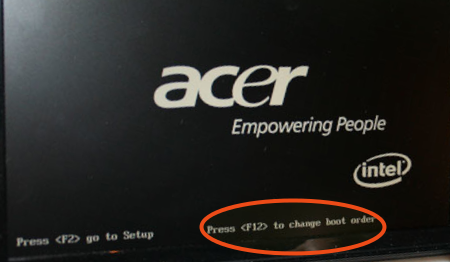
Si le choix du boot existe , ça peut etre une touche qui va de F1 a F12,Echap ou autres, normalement c'est indiqué sur la page du logo de l'ordi au démarrage
Par exemple
Portable 1 : Intel® Pentium(R) CPU 4405U @ 2.10GHz × 4 - Intel® HD Graphics 510 - 4 go de RAM ¦ Ubuntu 20.04 ¦ LMDE 4 ¦ Deepin 20.0 avec partition de données commune
Portable 2 : Toshiba A100-187 - Intel Celeron 1,60 GHz - ATI Radeon XPRESS 200M ¦ Lubuntu 18.04 ¦ Debian 10 Buster Lxde
Portable 2 : Toshiba A100-187 - Intel Celeron 1,60 GHz - ATI Radeon XPRESS 200M ¦ Lubuntu 18.04 ¦ Debian 10 Buster Lxde

Re: booster clé usb
bonjour
Faudrait répondre aux questions qui te sont posées si tu veux une aide efficace
Faudrait répondre aux questions qui te sont posées si tu veux une aide efficace
Modifié en dernier par yomane le mar. 24 déc. 2019 02:25, modifié 1 fois.

[/img]Discord : Invitation => https://discord.gg/HBWnGy3
"Jamais Souris ne confie a un seul trou sa Destinée"
-
Frankie0854
- Messages : 348
- Enregistré le : dim. 8 oct. 2017 17:02
Re: booster clé usb
je vous mes des photos de mon pc d infos que vous m' avez demander


PC 1 : System: Kernel: 6.8.0-134-generic arch: x86_64 bits: 64 compiler: gcc v: 13.3.0 clocksource: tsc
Distro: Linux Mint 22.3 Zena base: Ubuntu 24.04 noble Memory: total: 8 GiB note: est. available: 7.32 GiB used: 2.69 GiB (36.8%)
PC 2 : System: Kernel: 6.14.0-37-generic arch: x86_64 bits: 64 compiler: gcc v: 13.3.0 clocksource: tsc
Distro: Linux Mint 22.3 Zena base: Ubuntu 24.04 noble
Distro: Linux Mint 22.3 Zena base: Ubuntu 24.04 noble Memory: total: 8 GiB note: est. available: 7.32 GiB used: 2.69 GiB (36.8%)
PC 2 : System: Kernel: 6.14.0-37-generic arch: x86_64 bits: 64 compiler: gcc v: 13.3.0 clocksource: tsc
Distro: Linux Mint 22.3 Zena base: Ubuntu 24.04 noble
-
Frankie0854
- Messages : 348
- Enregistré le : dim. 8 oct. 2017 17:02
Re: booster clé usb impossible
avez vous des solution a mon probléme ?
PC 1 : System: Kernel: 6.8.0-134-generic arch: x86_64 bits: 64 compiler: gcc v: 13.3.0 clocksource: tsc
Distro: Linux Mint 22.3 Zena base: Ubuntu 24.04 noble Memory: total: 8 GiB note: est. available: 7.32 GiB used: 2.69 GiB (36.8%)
PC 2 : System: Kernel: 6.14.0-37-generic arch: x86_64 bits: 64 compiler: gcc v: 13.3.0 clocksource: tsc
Distro: Linux Mint 22.3 Zena base: Ubuntu 24.04 noble
Distro: Linux Mint 22.3 Zena base: Ubuntu 24.04 noble Memory: total: 8 GiB note: est. available: 7.32 GiB used: 2.69 GiB (36.8%)
PC 2 : System: Kernel: 6.14.0-37-generic arch: x86_64 bits: 64 compiler: gcc v: 13.3.0 clocksource: tsc
Distro: Linux Mint 22.3 Zena base: Ubuntu 24.04 noble
-
arghlub
- Administrateur du site
- Messages : 11788
- Enregistré le : dim. 21 mai 2017 08:19
- Localisation : Provence
Re: booster clé usb
yomane a écrit : dim. 22 déc. 2019 11:46 Faudrait répondre aux questions que te sont posées si tu veux une aide efficace
Tour1 (custom) • CPU Intel I7-7700K | CG Nvidia GTX 1080 | RAM 16Go | tripleBoot : LMint 22.3 | Debian 12 | MX Linux | XFCE
Tour2 (custom) • CPU AMD Athlon 5200+ | CG Nvidia GTX 560 | RAM 6Go | FreeBSD XFCE
Portable1 • MSI GF75 Thin 9SC | CPU Intel I7-9750H | CG Nvidia GTX 1650 | RAM 32Go | dualBoot : LMint 22.1 | MX Linux | XFCE
Portable2 • MacBook Air A1466 | CPU Intel I5-5250U | CG Intel HD Graphics 6000 | RAM 8Go | dualBoot : macOS Sierra | MX Linux XFCE
─────( pour une informatique libre ! )─────
Tour2 (custom) • CPU AMD Athlon 5200+ | CG Nvidia GTX 560 | RAM 6Go | FreeBSD XFCE
Portable1 • MSI GF75 Thin 9SC | CPU Intel I7-9750H | CG Nvidia GTX 1650 | RAM 32Go | dualBoot : LMint 22.1 | MX Linux | XFCE
Portable2 • MacBook Air A1466 | CPU Intel I5-5250U | CG Intel HD Graphics 6000 | RAM 8Go | dualBoot : macOS Sierra | MX Linux XFCE
─────( pour une informatique libre ! )─────