Bonjour. J'ai installé linuxmint depuis environ huit mois. Tout fonctionne parfaitement jusqu'à ce matin. J'ai une alerte de mon pc en disant que le répertoire / manque d' espace (moins de 1 go). Comment récupérer de la place, faire le ménage, repartionner mon disque SSD, ...?
Merci pour votre aide.
 le répertoire / manque d' espace...
le répertoire / manque d' espace...
System:Lenovo-G70-70 Kernel: 5.3.0-26-generic x86_64 bits: 64
Desktop: Cinnamon 4.4.8 Distro: Linux Mint 19.3 Tricia
Machine:Type Laptop LENOVO product: 80HW0011FR v: Lenovo G70-70
CPU:Dual Core model: Intel Core i5-4210U bits: 64 type: MT MCP
Graphics:Intel Haswell-ULT Integrated Graphics driver: i915.
Desktop: Cinnamon 4.4.8 Distro: Linux Mint 19.3 Tricia
Machine:Type Laptop LENOVO product: 80HW0011FR v: Lenovo G70-70
CPU:Dual Core model: Intel Core i5-4210U bits: 64 type: MT MCP
Graphics:Intel Haswell-ULT Integrated Graphics driver: i915.

Re: le répertoire / manque d' espace...
Tu peux repartitionner ton disque en bootant à partir d'un LiveUSB (ou LiveDVD) de Mint avec gparted...
Tu as quand même le droit de sauvegarder tes données auparavant (on ne sait jamais...).
Tu as quand même le droit de sauvegarder tes données auparavant (on ne sait jamais...).
LinuxMint Virginia Cinnamon et d'autres machines en MATE, XFCE... 20.x , 21.x ou 19.x
Tour : Asus F2A55 / AMD A8-5600K APU 3,6GHz / RAM 17Go / SSD 4To /Nvidia GeForce GT610 / LM21.3 Cinnamon
Portable : LDLC Mercure MH :Intel® Pentium(R) Silver N5030 CPU @ 1.10GHz × 4/RAM 8Go / Intel HD graphics 500 i915 / ) - LM22.3 MATE (sur HDD)
Tour : Asus F2A55 / AMD A8-5600K APU 3,6GHz / RAM 17Go / SSD 4To /Nvidia GeForce GT610 / LM21.3 Cinnamon
Portable : LDLC Mercure MH :Intel® Pentium(R) Silver N5030 CPU @ 1.10GHz × 4/RAM 8Go / Intel HD graphics 500 i915 / ) - LM22.3 MATE (sur HDD)
Re: le répertoire / manque d' espace...
Merci pour la réponse mais qu' est-ce qui fait que je n' ai plus assez d'espace sur mon /. Ne peut-on pas faire le ménage avant le repartionnement ex.: supprimer les anciens noyaux (je ne sait pas si celà prends beaucoup de place)?
System:Lenovo-G70-70 Kernel: 5.3.0-26-generic x86_64 bits: 64
Desktop: Cinnamon 4.4.8 Distro: Linux Mint 19.3 Tricia
Machine:Type Laptop LENOVO product: 80HW0011FR v: Lenovo G70-70
CPU:Dual Core model: Intel Core i5-4210U bits: 64 type: MT MCP
Graphics:Intel Haswell-ULT Integrated Graphics driver: i915.
Desktop: Cinnamon 4.4.8 Distro: Linux Mint 19.3 Tricia
Machine:Type Laptop LENOVO product: 80HW0011FR v: Lenovo G70-70
CPU:Dual Core model: Intel Core i5-4210U bits: 64 type: MT MCP
Graphics:Intel Haswell-ULT Integrated Graphics driver: i915.
Re: le répertoire / manque d' espace...
Bonjour
donne le retour de et
donne le retour de
Code : Tout sélectionner
sudo parted -lCode : Tout sélectionner
sudo blkid -o listPortable 1 : Intel® Pentium(R) CPU 4405U @ 2.10GHz × 4 - Intel® HD Graphics 510 - 4 go de RAM ¦ Ubuntu 20.04 ¦ LMDE 4 ¦ Deepin 20.0 avec partition de données commune
Portable 2 : Toshiba A100-187 - Intel Celeron 1,60 GHz - ATI Radeon XPRESS 200M ¦ Lubuntu 18.04 ¦ Debian 10 Buster Lxde
Portable 2 : Toshiba A100-187 - Intel Celeron 1,60 GHz - ATI Radeon XPRESS 200M ¦ Lubuntu 18.04 ¦ Debian 10 Buster Lxde
Re: le répertoire / manque d' espace...
Les retours attendus :
sudo blkid -o list
device fs_type label mount point UUID
-------------------------------------------------------------------------------
/dev/sda1 ext4 / 0b384aea-ee74-4b11-973a-c3c9b13d60fe
/dev/sda5 ext4 /home 06a9b462-0489-4f99-bd7b-18da26748f0a
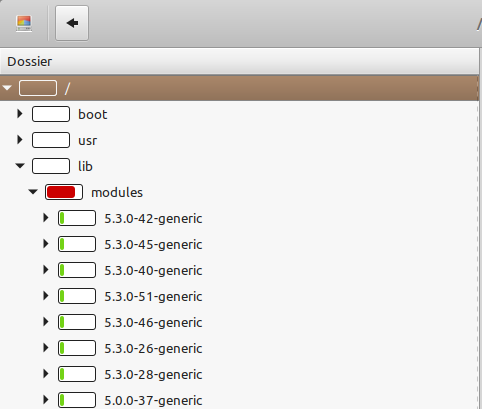
J'ai analysé la partition /, voici sa copie d'écran :
Code : Tout sélectionner
sudo parted -l
[sudo] Mot de passe de mdu02 :
Modèle : ATA Samsung SSD 860 (scsi)
Disque /dev/sda : 250GB
Taille des secteurs (logiques/physiques) : 512B/512B
Table de partitions : msdos
Drapeaux de disque :

Numéro  Début   Fin     Taille  Type      Système de fichiers  Drapeaux
 1      1049kB  40,0GB  40,0GB  primary   ext4                 démarrage
 2      40,0GB  250GB   210GB   extended
 5      40,0GB  250GB   210GB   logical   ext4
device fs_type label mount point UUID
-------------------------------------------------------------------------------
/dev/sda1 ext4 / 0b384aea-ee74-4b11-973a-c3c9b13d60fe
/dev/sda5 ext4 /home 06a9b462-0489-4f99-bd7b-18da26748f0a
J'ai analysé la partition /, voici sa copie d'écran :
System:Lenovo-G70-70 Kernel: 5.3.0-26-generic x86_64 bits: 64
Desktop: Cinnamon 4.4.8 Distro: Linux Mint 19.3 Tricia
Machine:Type Laptop LENOVO product: 80HW0011FR v: Lenovo G70-70
CPU:Dual Core model: Intel Core i5-4210U bits: 64 type: MT MCP
Graphics:Intel Haswell-ULT Integrated Graphics driver: i915.
Desktop: Cinnamon 4.4.8 Distro: Linux Mint 19.3 Tricia
Machine:Type Laptop LENOVO product: 80HW0011FR v: Lenovo G70-70
CPU:Dual Core model: Intel Core i5-4210U bits: 64 type: MT MCP
Graphics:Intel Haswell-ULT Integrated Graphics driver: i915.

Re: le répertoire / manque d' espace...
Slt ,
tu peux aussi en plus de clean faire :
ensuite tu relance baobab 
@+
tu peux aussi en plus de clean faire :
Code : Tout sélectionner
sudo apt autoremove@+

Re: le répertoire / manque d' espace...
Code : Tout sélectionner
sudo apt install ncduCode : Tout sélectionner
sudo ncdu -x /Portable 1 : Intel® Pentium(R) CPU 4405U @ 2.10GHz × 4 - Intel® HD Graphics 510 - 4 go de RAM ¦ Ubuntu 20.04 ¦ LMDE 4 ¦ Deepin 20.0 avec partition de données commune
Portable 2 : Toshiba A100-187 - Intel Celeron 1,60 GHz - ATI Radeon XPRESS 200M ¦ Lubuntu 18.04 ¦ Debian 10 Buster Lxde
Portable 2 : Toshiba A100-187 - Intel Celeron 1,60 GHz - ATI Radeon XPRESS 200M ¦ Lubuntu 18.04 ¦ Debian 10 Buster Lxde
Re: le répertoire / manque d' espace...
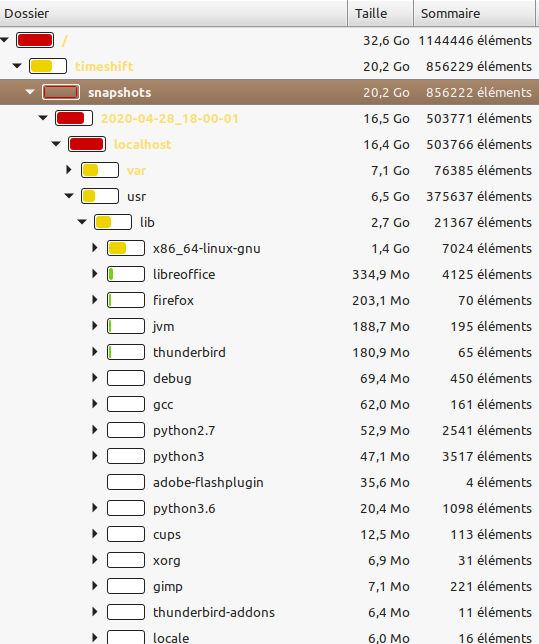
Nouveau "baobab"
System:Lenovo-G70-70 Kernel: 5.3.0-26-generic x86_64 bits: 64
Desktop: Cinnamon 4.4.8 Distro: Linux Mint 19.3 Tricia
Machine:Type Laptop LENOVO product: 80HW0011FR v: Lenovo G70-70
CPU:Dual Core model: Intel Core i5-4210U bits: 64 type: MT MCP
Graphics:Intel Haswell-ULT Integrated Graphics driver: i915.
Desktop: Cinnamon 4.4.8 Distro: Linux Mint 19.3 Tricia
Machine:Type Laptop LENOVO product: 80HW0011FR v: Lenovo G70-70
CPU:Dual Core model: Intel Core i5-4210U bits: 64 type: MT MCP
Graphics:Intel Haswell-ULT Integrated Graphics driver: i915.
Re: le répertoire / manque d' espace...
Code : Tout sélectionner
sudo ncdu -x /
--- / --------------------------------------------------------------------------
   18,8 GiB [##########] /timeshift
    5,1 GiB [##        ] /usr
    3,7 GiB [#         ] /var
    1,7 GiB [          ]  swapfile
  882,7 MiB [          ] /lib
  166,3 MiB [          ] /boot
   47,1 MiB [          ] /root
   18,1 MiB [          ] /sbin
   16,0 MiB [          ] /bin
   14,5 MiB [          ] /etc
  116,0 KiB [          ] /tmp
e  16,0 KiB [          ] /lost+found
    8,0 KiB [          ] /media
    4,0 KiB [          ] /lib64
e   4,0 KiB [          ] /srv
e   4,0 KiB [          ] /mnt
e   4,0 KiB [          ] /cdrom
@   0,0   B [          ]  initrd.img.old
@   0,0   B [          ]  initrd.img
@ 0,0 B [ ] vmlinuz.oldSystem:Lenovo-G70-70 Kernel: 5.3.0-26-generic x86_64 bits: 64
Desktop: Cinnamon 4.4.8 Distro: Linux Mint 19.3 Tricia
Machine:Type Laptop LENOVO product: 80HW0011FR v: Lenovo G70-70
CPU:Dual Core model: Intel Core i5-4210U bits: 64 type: MT MCP
Graphics:Intel Haswell-ULT Integrated Graphics driver: i915.
Desktop: Cinnamon 4.4.8 Distro: Linux Mint 19.3 Tricia
Machine:Type Laptop LENOVO product: 80HW0011FR v: Lenovo G70-70
CPU:Dual Core model: Intel Core i5-4210U bits: 64 type: MT MCP
Graphics:Intel Haswell-ULT Integrated Graphics driver: i915.
Re: le répertoire / manque d' espace...
Code : Tout sélectionner
sudo ncdu -x /
18,8 GiB [##########] /timeshift
    5,1 GiB [##        ] /usr
    3,7 GiB [#         ] /var
    1,7 GiB [          ]  swapfile
  882,7 MiB [          ] /lib
  166,3 MiB [          ] /boot
   47,1 MiB [          ] /root
   18,1 MiB [          ] /sbin
   16,0 MiB [          ] /bin
   14,5 MiB [          ] /etc
   88,0 KiB [          ] /tmp
e  16,0 KiB [          ] /lost+found
    8,0 KiB [          ] /media
    4,0 KiB [          ] /lib64
e   4,0 KiB [          ] /srv
e   4,0 KiB [          ] /mnt
e   4,0 KiB [          ] /cdrom
@   0,0   B [          ]  initrd.img.old
@   0,0   B [          ]  initrd.img
@   0,0   B [          ]  vmlinuz.old
System:Lenovo-G70-70 Kernel: 5.3.0-26-generic x86_64 bits: 64
Desktop: Cinnamon 4.4.8 Distro: Linux Mint 19.3 Tricia
Machine:Type Laptop LENOVO product: 80HW0011FR v: Lenovo G70-70
CPU:Dual Core model: Intel Core i5-4210U bits: 64 type: MT MCP
Graphics:Intel Haswell-ULT Integrated Graphics driver: i915.
Desktop: Cinnamon 4.4.8 Distro: Linux Mint 19.3 Tricia
Machine:Type Laptop LENOVO product: 80HW0011FR v: Lenovo G70-70
CPU:Dual Core model: Intel Core i5-4210U bits: 64 type: MT MCP
Graphics:Intel Haswell-ULT Integrated Graphics driver: i915.