
 ouvrir xnview par défaut avec la touche impression d'écran de l'ordi
ouvrir xnview par défaut avec la touche impression d'écran de l'ordi
Bonjour, tout est dans le titre... mais comment faire alors que j'ai cette fenêtre qui s'ouvre après action sur la touche "ImpÉc" de mon ordinateur ?
System:
Kernel: 6.8.0-79-generic arch: x86_64 bits: 64 compiler: gcc v: 13.3.0 clocksource: tsc
Desktop: Cinnamon v: 6.4.8 tk: GTK v: 3.24.41 wm: Muffin v: 6.4.1 vt: 7 dm: LightDM v: 1.30.0
Distro: Linux Mint 22.1 Xia base: Ubuntu 24.04 noble
Machine:
Type: Laptop System: LENOVO product: 20UHS01P00 v: ThinkPad T14s Gen 1
Kernel: 6.8.0-79-generic arch: x86_64 bits: 64 compiler: gcc v: 13.3.0 clocksource: tsc
Desktop: Cinnamon v: 6.4.8 tk: GTK v: 3.24.41 wm: Muffin v: 6.4.1 vt: 7 dm: LightDM v: 1.30.0
Distro: Linux Mint 22.1 Xia base: Ubuntu 24.04 noble
Machine:
Type: Laptop System: LENOVO product: 20UHS01P00 v: ThinkPad T14s Gen 1
Re: ouvrir xnview par défaut avec la touche impression d'écran de l'ordi
Désolé mais je ne comprends pas comment faire...
je suis arrivé là mais quoi que je tente d'autre n'amène aucun changement

je suis arrivé là mais quoi que je tente d'autre n'amène aucun changement
System:
Kernel: 6.8.0-79-generic arch: x86_64 bits: 64 compiler: gcc v: 13.3.0 clocksource: tsc
Desktop: Cinnamon v: 6.4.8 tk: GTK v: 3.24.41 wm: Muffin v: 6.4.1 vt: 7 dm: LightDM v: 1.30.0
Distro: Linux Mint 22.1 Xia base: Ubuntu 24.04 noble
Machine:
Type: Laptop System: LENOVO product: 20UHS01P00 v: ThinkPad T14s Gen 1
Kernel: 6.8.0-79-generic arch: x86_64 bits: 64 compiler: gcc v: 13.3.0 clocksource: tsc
Desktop: Cinnamon v: 6.4.8 tk: GTK v: 3.24.41 wm: Muffin v: 6.4.1 vt: 7 dm: LightDM v: 1.30.0
Distro: Linux Mint 22.1 Xia base: Ubuntu 24.04 noble
Machine:
Type: Laptop System: LENOVO product: 20UHS01P00 v: ThinkPad T14s Gen 1
Re: ouvrir xnview par défaut avec la touche impression d'écran de l'ordi
Re désolé mais je n'arrive à rien de concluant... ça n'abouti pas, l'assignation ne se fait pas
comment assigne t-on la touche ImpÉcran ?
comment assigne t-on la touche ImpÉcran ?
System:
Kernel: 6.8.0-79-generic arch: x86_64 bits: 64 compiler: gcc v: 13.3.0 clocksource: tsc
Desktop: Cinnamon v: 6.4.8 tk: GTK v: 3.24.41 wm: Muffin v: 6.4.1 vt: 7 dm: LightDM v: 1.30.0
Distro: Linux Mint 22.1 Xia base: Ubuntu 24.04 noble
Machine:
Type: Laptop System: LENOVO product: 20UHS01P00 v: ThinkPad T14s Gen 1
Kernel: 6.8.0-79-generic arch: x86_64 bits: 64 compiler: gcc v: 13.3.0 clocksource: tsc
Desktop: Cinnamon v: 6.4.8 tk: GTK v: 3.24.41 wm: Muffin v: 6.4.1 vt: 7 dm: LightDM v: 1.30.0
Distro: Linux Mint 22.1 Xia base: Ubuntu 24.04 noble
Machine:
Type: Laptop System: LENOVO product: 20UHS01P00 v: ThinkPad T14s Gen 1
Re: ouvrir xnview par défaut avec la touche impression d'écran de l'ordi
C'est quoi xfce ?
voir ma nouvelle signature
voir ma nouvelle signature
System:
Kernel: 6.8.0-79-generic arch: x86_64 bits: 64 compiler: gcc v: 13.3.0 clocksource: tsc
Desktop: Cinnamon v: 6.4.8 tk: GTK v: 3.24.41 wm: Muffin v: 6.4.1 vt: 7 dm: LightDM v: 1.30.0
Distro: Linux Mint 22.1 Xia base: Ubuntu 24.04 noble
Machine:
Type: Laptop System: LENOVO product: 20UHS01P00 v: ThinkPad T14s Gen 1
Kernel: 6.8.0-79-generic arch: x86_64 bits: 64 compiler: gcc v: 13.3.0 clocksource: tsc
Desktop: Cinnamon v: 6.4.8 tk: GTK v: 3.24.41 wm: Muffin v: 6.4.1 vt: 7 dm: LightDM v: 1.30.0
Distro: Linux Mint 22.1 Xia base: Ubuntu 24.04 noble
Machine:
Type: Laptop System: LENOVO product: 20UHS01P00 v: ThinkPad T14s Gen 1
-
arghlub

- Administrateur du site
- Messages : 11874
- Enregistré le : dim. 21 mai 2017 08:19
- Localisation : Provence
Re: ouvrir xnview par défaut avec la touche impression d'écran de l'ordi
Salut,
XFCE, c'est un environnement de bureau (comme Cinnamon, Mate, KDE, etc ...).
À priori d'apré ta signature tu es avec l'environnement de bureau Cinnamon.
Je n'ai pas de Cinnamon sous la main, donc pas trop moyen de t'aider pour l'instant.
Mais essaie tout de même de lancer le menu et te taper «Clavier» (cela va rechercher auto), tu devrais sûrement tomber sur des paramètres système qui devraient te permettre de configurer ton clavier.
XFCE, c'est un environnement de bureau (comme Cinnamon, Mate, KDE, etc ...).
À priori d'apré ta signature tu es avec l'environnement de bureau Cinnamon.
Je n'ai pas de Cinnamon sous la main, donc pas trop moyen de t'aider pour l'instant.
Mais essaie tout de même de lancer le menu et te taper «Clavier» (cela va rechercher auto), tu devrais sûrement tomber sur des paramètres système qui devraient te permettre de configurer ton clavier.
Tour1 (custom) • CPU Intel I7-7700K | CG Nvidia GTX 1080 | RAM 16Go | tripleBoot : LMint 22.3 | Debian 12 | MX Linux | XFCE
Tour2 (custom) • CPU AMD Athlon 5200+ | CG Nvidia GTX 560 | RAM 6Go | FreeBSD XFCE
Portable1 • MSI GF75 Thin 9SC | CPU Intel I7-9750H | CG Nvidia GTX 1650 | RAM 32Go | dualBoot : LMint 22.1 | MX Linux | XFCE
Portable2 • MacBook Air A1466 | CPU Intel I5-5250U | CG Intel HD Graphics 6000 | RAM 8Go | dualBoot : macOS Sierra | MX Linux XFCE
─────( pour une informatique libre ! )─────
Tour2 (custom) • CPU AMD Athlon 5200+ | CG Nvidia GTX 560 | RAM 6Go | FreeBSD XFCE
Portable1 • MSI GF75 Thin 9SC | CPU Intel I7-9750H | CG Nvidia GTX 1650 | RAM 32Go | dualBoot : LMint 22.1 | MX Linux | XFCE
Portable2 • MacBook Air A1466 | CPU Intel I5-5250U | CG Intel HD Graphics 6000 | RAM 8Go | dualBoot : macOS Sierra | MX Linux XFCE
─────( pour une informatique libre ! )─────
Re: ouvrir xnview par défaut avec la touche impression d'écran de l'ordi
Désolé, je ne pensais pas que ça avait de l'importance, en fait j'ai changé d'ordi, l'autre déconnait...
mais si je fais ce que tu proposes, je tombe là où j'étais précédemment... mais toujours sans résultat !

mais si je fais ce que tu proposes, je tombe là où j'étais précédemment... mais toujours sans résultat !
System:
Kernel: 6.8.0-79-generic arch: x86_64 bits: 64 compiler: gcc v: 13.3.0 clocksource: tsc
Desktop: Cinnamon v: 6.4.8 tk: GTK v: 3.24.41 wm: Muffin v: 6.4.1 vt: 7 dm: LightDM v: 1.30.0
Distro: Linux Mint 22.1 Xia base: Ubuntu 24.04 noble
Machine:
Type: Laptop System: LENOVO product: 20UHS01P00 v: ThinkPad T14s Gen 1
Kernel: 6.8.0-79-generic arch: x86_64 bits: 64 compiler: gcc v: 13.3.0 clocksource: tsc
Desktop: Cinnamon v: 6.4.8 tk: GTK v: 3.24.41 wm: Muffin v: 6.4.1 vt: 7 dm: LightDM v: 1.30.0
Distro: Linux Mint 22.1 Xia base: Ubuntu 24.04 noble
Machine:
Type: Laptop System: LENOVO product: 20UHS01P00 v: ThinkPad T14s Gen 1
-
arghlub
- Administrateur du site
- Messages : 11874
- Enregistré le : dim. 21 mai 2017 08:19
- Localisation : Provence
Re: ouvrir xnview par défaut avec la touche impression d'écran de l'ordi

Tour1 (custom) • CPU Intel I7-7700K | CG Nvidia GTX 1080 | RAM 16Go | tripleBoot : LMint 22.3 | Debian 12 | MX Linux | XFCE
Tour2 (custom) • CPU AMD Athlon 5200+ | CG Nvidia GTX 560 | RAM 6Go | FreeBSD XFCE
Portable1 • MSI GF75 Thin 9SC | CPU Intel I7-9750H | CG Nvidia GTX 1650 | RAM 32Go | dualBoot : LMint 22.1 | MX Linux | XFCE
Portable2 • MacBook Air A1466 | CPU Intel I5-5250U | CG Intel HD Graphics 6000 | RAM 8Go | dualBoot : macOS Sierra | MX Linux XFCE
─────( pour une informatique libre ! )─────
Tour2 (custom) • CPU AMD Athlon 5200+ | CG Nvidia GTX 560 | RAM 6Go | FreeBSD XFCE
Portable1 • MSI GF75 Thin 9SC | CPU Intel I7-9750H | CG Nvidia GTX 1650 | RAM 32Go | dualBoot : LMint 22.1 | MX Linux | XFCE
Portable2 • MacBook Air A1466 | CPU Intel I5-5250U | CG Intel HD Graphics 6000 | RAM 8Go | dualBoot : macOS Sierra | MX Linux XFCE
─────( pour une informatique libre ! )─────
Re: ouvrir xnview par défaut avec la touche impression d'écran de l'ordi
J'ai du trop insister car maintenant, ma touche Imp-écran du clavier ne fonctionne plus... "l’exécution du processus ne peut aboutir... permission non accordée..."
que faire ?
que faire ?
System:
Kernel: 6.8.0-79-generic arch: x86_64 bits: 64 compiler: gcc v: 13.3.0 clocksource: tsc
Desktop: Cinnamon v: 6.4.8 tk: GTK v: 3.24.41 wm: Muffin v: 6.4.1 vt: 7 dm: LightDM v: 1.30.0
Distro: Linux Mint 22.1 Xia base: Ubuntu 24.04 noble
Machine:
Type: Laptop System: LENOVO product: 20UHS01P00 v: ThinkPad T14s Gen 1
Kernel: 6.8.0-79-generic arch: x86_64 bits: 64 compiler: gcc v: 13.3.0 clocksource: tsc
Desktop: Cinnamon v: 6.4.8 tk: GTK v: 3.24.41 wm: Muffin v: 6.4.1 vt: 7 dm: LightDM v: 1.30.0
Distro: Linux Mint 22.1 Xia base: Ubuntu 24.04 noble
Machine:
Type: Laptop System: LENOVO product: 20UHS01P00 v: ThinkPad T14s Gen 1
-
arghlub
- Administrateur du site
- Messages : 11874
- Enregistré le : dim. 21 mai 2017 08:19
- Localisation : Provence
Re: ouvrir xnview par défaut avec la touche impression d'écran de l'ordi
 d'apès ta captue d'écran (/!\ je ne peux pas tester vu que pas de Cinnamon sous la main), tu recherches dans en raccourcis un truc du syle «capture écran» → screensaver → touche Prn .... tu le supprimes et en mets un autre (ou pas).
Puis tu crées un nouveau raccouci avec XnView.
pas sûr que cela marche, juste une idée.
Tour1 (custom) • CPU Intel I7-7700K | CG Nvidia GTX 1080 | RAM 16Go | tripleBoot : LMint 22.3 | Debian 12 | MX Linux | XFCE
Tour2 (custom) • CPU AMD Athlon 5200+ | CG Nvidia GTX 560 | RAM 6Go | FreeBSD XFCE
Portable1 • MSI GF75 Thin 9SC | CPU Intel I7-9750H | CG Nvidia GTX 1650 | RAM 32Go | dualBoot : LMint 22.1 | MX Linux | XFCE
Portable2 • MacBook Air A1466 | CPU Intel I5-5250U | CG Intel HD Graphics 6000 | RAM 8Go | dualBoot : macOS Sierra | MX Linux XFCE
─────( pour une informatique libre ! )─────
Tour2 (custom) • CPU AMD Athlon 5200+ | CG Nvidia GTX 560 | RAM 6Go | FreeBSD XFCE
Portable1 • MSI GF75 Thin 9SC | CPU Intel I7-9750H | CG Nvidia GTX 1650 | RAM 32Go | dualBoot : LMint 22.1 | MX Linux | XFCE
Portable2 • MacBook Air A1466 | CPU Intel I5-5250U | CG Intel HD Graphics 6000 | RAM 8Go | dualBoot : macOS Sierra | MX Linux XFCE
─────( pour une informatique libre ! )─────
Re: ouvrir xnview par défaut avec la touche impression d'écran de l'ordi
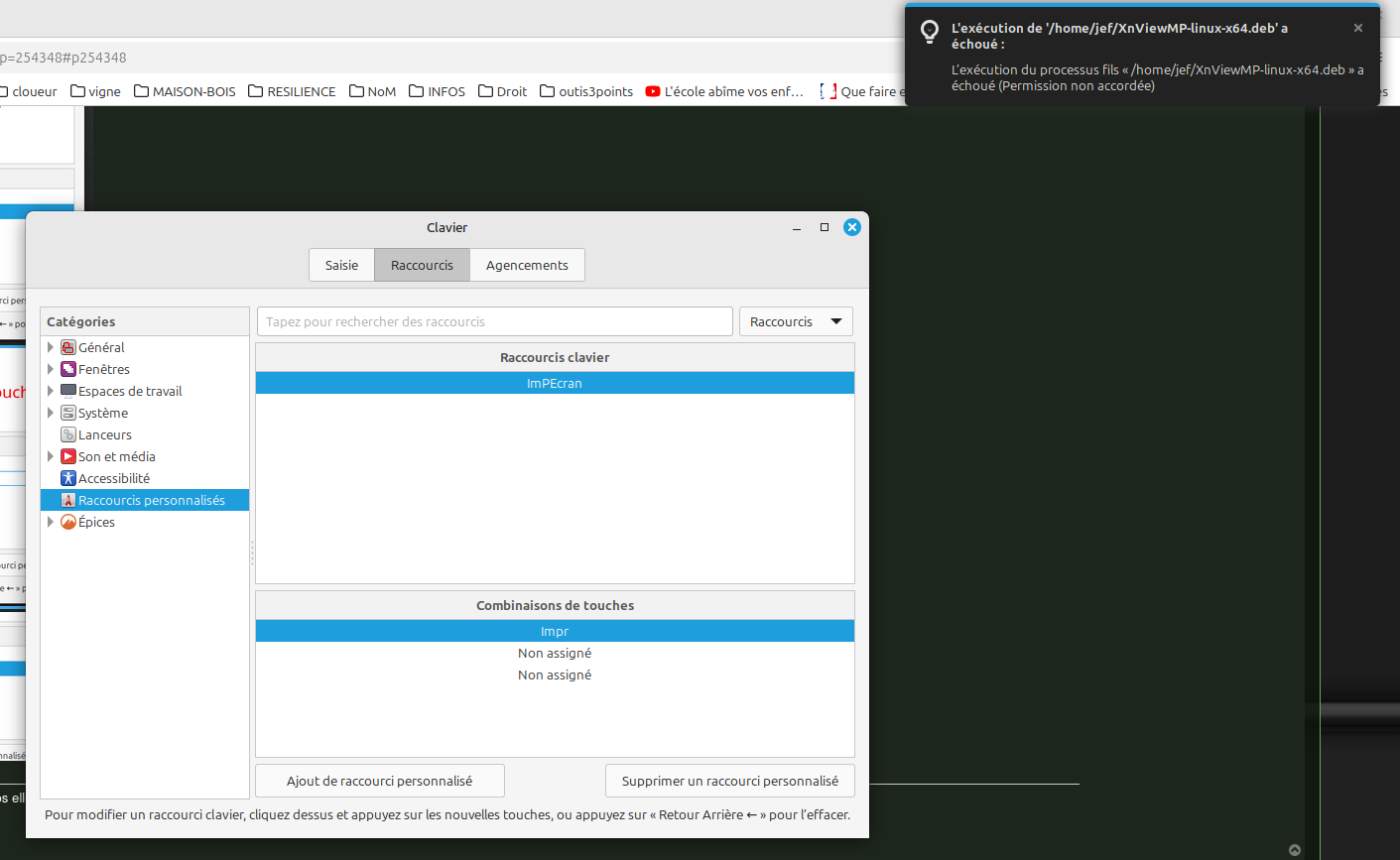
merci, mais ça ne s'arrange pas, j'ai fait dans l'ordre ce que tu propose... mais au final quand j'appuie sur la touche du clavier "ImpEcran" j'obtiens une erreur : en haut à droite de l'image
System:
Kernel: 6.8.0-79-generic arch: x86_64 bits: 64 compiler: gcc v: 13.3.0 clocksource: tsc
Desktop: Cinnamon v: 6.4.8 tk: GTK v: 3.24.41 wm: Muffin v: 6.4.1 vt: 7 dm: LightDM v: 1.30.0
Distro: Linux Mint 22.1 Xia base: Ubuntu 24.04 noble
Machine:
Type: Laptop System: LENOVO product: 20UHS01P00 v: ThinkPad T14s Gen 1
Kernel: 6.8.0-79-generic arch: x86_64 bits: 64 compiler: gcc v: 13.3.0 clocksource: tsc
Desktop: Cinnamon v: 6.4.8 tk: GTK v: 3.24.41 wm: Muffin v: 6.4.1 vt: 7 dm: LightDM v: 1.30.0
Distro: Linux Mint 22.1 Xia base: Ubuntu 24.04 noble
Machine:
Type: Laptop System: LENOVO product: 20UHS01P00 v: ThinkPad T14s Gen 1