Si j'ai bien compris, c'est «sdb» qu'il faut selon le cas monter ou démonter et pas la partition «sdb1»
A ce stade, c'est résolu dans le cadre de la dernière commande exécutée plus haut et qui a établi l'existence d'un bit défectueux ; ceci serait réparé, mais il paraît qu'un secteur défectueux repose tôt ou tard le même problème
J'ai toutefois utilisé smartmontools, mais je me suis emmêlé les pinceaux avec les commandes que je ne maîtrise pas totalement car j'ai du mal à trouver la syntaxe correcte, même avec leur «notice explicative»
Code : Tout sélectionner
linuxing@linuxing-Satellite-Pro-S300:~$ smartctl -i /dev/sda
smartctl 7.0 2018-12-30 r4883 [x86_64-linux-4.15.0-115-generic] (local build)
Copyright (C) 2002-18, Bruce Allen, Christian Franke, www.smartmontools.org

Smartctl open device: /dev/sda failed: Permission denied
linuxing@linuxing-Satellite-Pro-S300:~$ smartctl -i /dev/sdb
smartctl 7.0 2018-12-30 r4883 [x86_64-linux-4.15.0-115-generic] (local build)
Copyright (C) 2002-18, Bruce Allen, Christian Franke, www.smartmontools.org

/dev/sdb: Unknown USB bridge [0x058f:0x6387 (0x100)]
Please specify device type with the -d option.

Use smartctl -h to get a usage summary

linuxing@linuxing-Satellite-Pro-S300:~$ sudo -s
root@linuxing-Satellite-Pro-S300:~# lsblk
NAME         MAJ:MIN RM   SIZE RO TYPE MOUNTPOINT
loop0          7:0    0    97M  1 loop /snap/core/9665
loop1          7:1    0  96,6M  1 loop /snap/core/9804
loop2          7:2    0  17,9M  1 loop /snap/pdftk/9
loop3          7:3    0    80G  0 loop
└─veracrypt1 253:0    0    80G  0 dm   /media/veracrypt1
sda            8:0    0 149,1G  0 disk
└─sda1         8:1    0 149,1G  0 part /
sdb            8:16   1    58G  0 disk
└─sdb1         8:17   1    58G  0 part
sr0           11:0    1  1024M  0 rom
root@linuxing-Satellite-Pro-S300:~# smartctl -a /dev/sdb
smartctl 7.0 2018-12-30 r4883 [x86_64-linux-4.15.0-115-generic] (local build)
Copyright (C) 2002-18, Bruce Allen, Christian Franke, www.smartmontools.org

/dev/sdb: Unknown USB bridge [0x058f:0x6387 (0x100)]
Please specify device type with the -d option.

Use smartctl -h to get a usage summary

root@linuxing-Satellite-Pro-S300:~# smartctl -h
smartctl 7.0 2018-12-30 r4883 [x86_64-linux-4.15.0-115-generic] (local build)
Copyright (C) 2002-18, Bruce Allen, Christian Franke, www.smartmontools.org

Usage: smartctl [options] device

============================================ SHOW INFORMATION OPTIONS =====

  -h, --help, --usage
         Display this help and exit

  -V, --version, --copyright, --license
         Print license, copyright, and version information and exit

  -i, --info
         Show identity information for device

  --identify[=[w][nvb]]
         Show words and bits from IDENTIFY DEVICE data                (ATA)

  -g NAME, --get=NAME
        Get device setting: all, aam, apm, dsn, lookahead, security,
        wcache, rcache, wcreorder, wcache-sct

  -a, --all
         Show all SMART information for device

  -x, --xall
         Show all information for device

  --scan
         Scan for devices

  --scan-open
         Scan for devices and try to open each device

================================== SMARTCTL RUN-TIME BEHAVIOR OPTIONS =====

  -j, --json[=[cgiosuv]]
         Print output in JSON format

  -q TYPE, --quietmode=TYPE                                           (ATA)
         Set smartctl quiet mode to one of: errorsonly, silent, noserial

  -d TYPE, --device=TYPE
         Specify device type to one of:
         ata, scsi[+TYPE], nvme[,NSID], sat[,auto][,N][+TYPE], usbcypress[,X], usbjmicron[,p][,x][,N], usbprolific, usbsunplus, sntjmicron[,NSID], intelliprop,N[+TYPE], marvell, areca,N/E, 3ware,N, hpt,L/M/N, megaraid,N, aacraid,H,L,ID, cciss,N, auto, test

  -T TYPE, --tolerance=TYPE                                           (ATA)
         Tolerance: normal, conservative, permissive, verypermissive

  -b TYPE, --badsum=TYPE                                              (ATA)
         Set action on bad checksum to one of: warn, exit, ignore

  -r TYPE, --report=TYPE
         Report transactions (see man page)

  -n MODE[,STATUS], --nocheck=MODE[,STATUS]                           (ATA)
         No check if: never, sleep, standby, idle (see man page)

============================== DEVICE FEATURE ENABLE/DISABLE COMMANDS =====

  -s VALUE, --smart=VALUE
        Enable/disable SMART on device (on/off)

  -o VALUE, --offlineauto=VALUE                                       (ATA)
        Enable/disable automatic offline testing on device (on/off)

  -S VALUE, --saveauto=VALUE                                          (ATA)
        Enable/disable Attribute autosave on device (on/off)

  -s NAME[,VALUE], --set=NAME[,VALUE]
        Enable/disable/change device setting: aam,[N|off], apm,[N|off],
        dsn,[on|off], lookahead,[on|off], security-freeze,
        standby,[N|off|now], wcache,[on|off], rcache,[on|off],
        wcreorder,[on|off[,p]], wcache-sct,[ata|on|off[,p]]

======================================= READ AND DISPLAY DATA OPTIONS =====

  -H, --health
        Show device SMART health status

  -c, --capabilities                                            (ATA, NVMe)
        Show device SMART capabilities

  -A, --attributes
        Show device SMART vendor-specific Attributes and values

  -f FORMAT, --format=FORMAT                                          (ATA)
        Set output format for attributes: old, brief, hex[,id|val]

  -l TYPE, --log=TYPE
        Show device log. TYPE: error, selftest, selective, directory[,g|s],
        xerror[,N][,error], xselftest[,N][,selftest], background,
        sasphy[,reset], sataphy[,reset], scttemp[sts,hist],
        scttempint,N[,p], scterc[,N,M], devstat[,N], defects[,N], ssd,
        gplog,N[,RANGE], smartlog,N[,RANGE], nvmelog,N,SIZE

  -v N,OPTION , --vendorattribute=N,OPTION                            (ATA)
        Set display OPTION for vendor Attribute N (see man page)

  -F TYPE, --firmwarebug=TYPE                                         (ATA)
        Use firmware bug workaround:
        none, nologdir, samsung, samsung2, samsung3, xerrorlba, swapid

  -P TYPE, --presets=TYPE                                             (ATA)
        Drive-specific presets: use, ignore, show, showall

  -B [+]FILE, --drivedb=[+]FILE                                       (ATA)
        Read and replace [add] drive database from FILE
        [default is +/etc/smart_drivedb.h
         and then    /var/lib/smartmontools/drivedb/drivedb.h]

============================================ DEVICE SELF-TEST OPTIONS =====

  -t TEST, --test=TEST
        Run test. TEST: offline, short, long, conveyance, force, vendor,N,
                        select,M-N, pending,N, afterselect,[on|off]

  -C, --captive
        Do test in captive mode (along with -t)

  -X, --abort
        Abort any non-captive test on device

=================================================== SMARTCTL EXAMPLES =====

  smartctl --all /dev/sda                    (Prints all SMART information)

  smartctl --smart=on --offlineauto=on --saveauto=on /dev/sda
                                              (Enables SMART on first disk)

  smartctl --test=long /dev/sda          (Executes extended disk self-test)

  smartctl --attributes --log=selftest --quietmode=errorsonly /dev/sda
                                      (Prints Self-Test & Attribute errors)
  smartctl --all --device=3ware,2 /dev/sda
  smartctl --all --device=3ware,2 /dev/twe0
  smartctl --all --device=3ware,2 /dev/twa0
  smartctl --all --device=3ware,2 /dev/twl0
          (Prints all SMART info for 3rd ATA disk on 3ware RAID controller)
  smartctl --all --device=hpt,1/1/3 /dev/sda
          (Prints all SMART info for the SATA disk attached to the 3rd PMPort
           of the 1st channel on the 1st HighPoint RAID controller)
  smartctl --all --device=areca,3/1 /dev/sg2
          (Prints all SMART info for 3rd ATA disk of the 1st enclosure
           on Areca RAID controller)

root@linuxing-Satellite-Pro-S300:~# smartctl -d /dev/sdb
smartctl 7.0 2018-12-30 r4883 [x86_64-linux-4.15.0-115-generic] (local build)
Copyright (C) 2002-18, Bruce Allen, Christian Franke, www.smartmontools.org

ERROR: smartctl requires a device name as the final command-line argument.


Use smartctl -h to get a usage summary

root@linuxing-Satellite-Pro-S300:~# smartctl -d /dev/USB mauve
smartctl 7.0 2018-12-30 r4883 [x86_64-linux-4.15.0-115-generic] (local build)
Copyright (C) 2002-18, Bruce Allen, Christian Franke, www.smartmontools.org

mauve: Unknown device type '/dev/USB'
=======> VALID ARGUMENTS ARE: ata, scsi[+TYPE], nvme[,NSID], sat[,auto][,N][+TYPE], usbcypress[,X], usbjmicron[,p][,x][,N], usbprolific, usbsunplus, sntjmicron[,NSID], intelliprop,N[+TYPE], marvell, areca,N/E, 3ware,N, hpt,L/M/N, megaraid,N, aacraid,H,L,ID, cciss,N, auto, test <=======

Use smartctl -h to get a usage summary

root@linuxing-Satellite-Pro-S300:~#


 En voici le résultat :


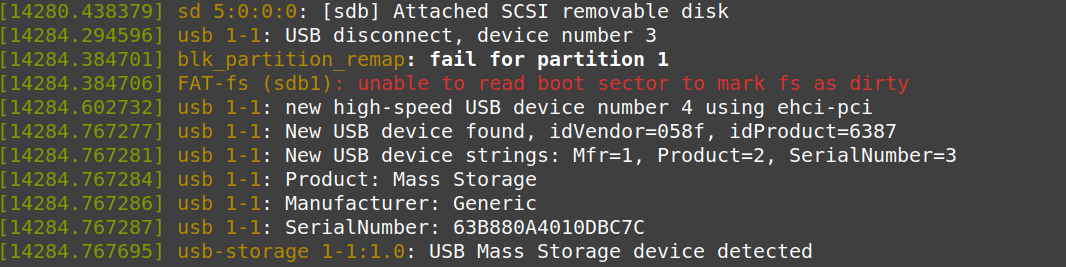
 et il semble que le IdVendor ne soit pas dans la liste