loutch
Messages : 526 Enregistré le : lun. 13 juil. 2015 17:32Localisation : Sarreguemines
Message
par loutch sam. 13 oct. 2018 16:07
Hello
Voila je voudrais lancer un script avec crontab toute les heures mais le script ne se lance pas .Le script fonctionne en le lançant @ la mano
Code : Tout sélectionner
crontab -l
# Edit this file to introduce tasks to be run by cron.
#
# Each task to run has to be defined through a single line
# indicating with different fields when the task will be run
# and what command to run for the task
#
# To define the time you can provide concrete values for
# minute (m), hour (h), day of month (dom), month (mon),
# and day of week (dow) or use '*' in these fields (for 'any').#
# Notice that tasks will be started based on the cron's system
# daemon's notion of time and timezones.
#
# Output of the crontab jobs (including errors) is sent through
# email to the user the crontab file belongs to (unless redirected).
#
# For example, you can run a backup of all your user accounts
# at 5 a.m every week with:
# 0 5 * * 1 tar -zcf /var/backups/home.tgz /home/
#
# For more information see the manual pages of crontab(5) and cron(8)
#
# m h  dom mon dow   command


0 * * * * bash /home/loutch/Images/hourWallpapers.sh
Voila mauvaise configuration du crontab ,
merci pour toutes vos lumières
@+
Modifié en dernier par
loutch le mer. 17 oct. 2018 18:17, modifié 1 fois.
HP Pavilion g 7 1357 sf avec ssd Xia xfce Mageia 9 xfce
Asus ROG avec ubuntu 18.04 xfce et ubuntu 24.04 xfce
arghlub
Administrateur du site
Messages : 11874 Enregistré le : dim. 21 mai 2017 08:19Localisation : Provence
Message
par arghlub sam. 13 oct. 2018 22:31
Salut,
pour t'aider dans la config de cron, tu pourrais utiliser un outil en ligne si tu n'es pas à l'aise à la mano :
Tour1 (custom) • CPU Intel I7-7700K | CG Nvidia GTX 1080 | RAM 16Go | tripleBoot : LMint 22.3 Debian 12 MX Linux | XFCE Tour2 (custom) • CPU AMD Athlon 5200+ | CG Nvidia GTX 560 | RAM 6Go | FreeBSD XFCE Portable1 • MSI GF75 Thin 9SC | CPU Intel I7-9750H | CG Nvidia GTX 1650 | RAM 32Go | dualBoot : LMint 22.1 MX Linux | XFCE Portable2 • MacBook Air A1466 | CPU Intel I5-5250U | CG Intel HD Graphics 6000 | RAM 8Go | dualBoot : macOS Sierra MX Linux XFCE ─────( pour une informatique libre ! )─────
arghlub
Administrateur du site
Messages : 11874 Enregistré le : dim. 21 mai 2017 08:19Localisation : Provence
Message
par arghlub sam. 13 oct. 2018 22:41
Tu veux lancer ton script avec quelle fréquence ????
De plus, dans ta commande : entoure "bash /home/loutch/Images/hourWallpapers.sh" de guillemets
Tour1 (custom) • CPU Intel I7-7700K | CG Nvidia GTX 1080 | RAM 16Go | tripleBoot : LMint 22.3 Debian 12 MX Linux | XFCE Tour2 (custom) • CPU AMD Athlon 5200+ | CG Nvidia GTX 560 | RAM 6Go | FreeBSD XFCE Portable1 • MSI GF75 Thin 9SC | CPU Intel I7-9750H | CG Nvidia GTX 1650 | RAM 32Go | dualBoot : LMint 22.1 MX Linux | XFCE Portable2 • MacBook Air A1466 | CPU Intel I5-5250U | CG Intel HD Graphics 6000 | RAM 8Go | dualBoot : macOS Sierra MX Linux XFCE ─────( pour une informatique libre ! )─────
loutch
Messages : 526 Enregistré le : lun. 13 juil. 2015 17:32Localisation : Sarreguemines
Message
par loutch lun. 15 oct. 2018 09:22
hello
arghlub a écrit : Tu veux lancer ton script avec quelle fréquence ????
De plus, dans ta commande : entoure "bash /home/loutch/Images/hourWallpapers.sh" de guillemets
je voudrais le lancer toutes les heures
cronmaker avec
me donne ceci
crontab generator me donne ceci
Code : Tout sélectionner
* * * * * bash /home/loutch/hourWallpapers.sh >/dev/null 2>&1 >/dev/null 2>&1
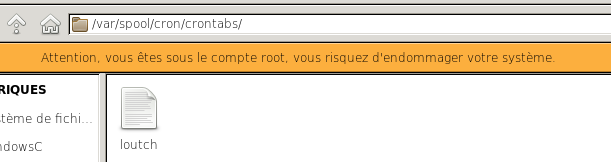
Il ni aurais pas une histoire de permissions parce que j'ai ceci dans /var/spool/cron
crontabs doit etre ouvert en root
Code : Tout sélectionner
# DO NOT EDIT THIS FILE - edit the master and reinstall.
# (/tmp/crontab.A1Vzej/crontab installed on Mon Oct 15 09:08:07 2018)
# (Cron version -- $Id: crontab.c,v 2.13 1994/01/17 03:20:37 vixie Exp $)
0 * * * * bash /home/loutch/hourWallpapers.sh >/dev/null 2>&1
qui correspond
Code : Tout sélectionner
crontab -l
0 * * * * bash /home/loutch/hourWallpapers.sh >/dev/null 2>&1
donc est-ce que l'utilisateur loutch est autorisé a lancer du cron
@+
HP Pavilion g 7 1357 sf avec ssd Xia xfce Mageia 9 xfce
Asus ROG avec ubuntu 18.04 xfce et ubuntu 24.04 xfce
arghlub
Administrateur du site
Messages : 11874 Enregistré le : dim. 21 mai 2017 08:19Localisation : Provence
Message
par arghlub lun. 15 oct. 2018 09:56
Non rien à voir avec les droits par contre....
Pour lancer le script toutes les heures, ta ligne cron devrait plutôt ressembler à ça :
Tour1 (custom) • CPU Intel I7-7700K | CG Nvidia GTX 1080 | RAM 16Go | tripleBoot : LMint 22.3 Debian 12 MX Linux | XFCE Tour2 (custom) • CPU AMD Athlon 5200+ | CG Nvidia GTX 560 | RAM 6Go | FreeBSD XFCE Portable1 • MSI GF75 Thin 9SC | CPU Intel I7-9750H | CG Nvidia GTX 1650 | RAM 32Go | dualBoot : LMint 22.1 MX Linux | XFCE Portable2 • MacBook Air A1466 | CPU Intel I5-5250U | CG Intel HD Graphics 6000 | RAM 8Go | dualBoot : macOS Sierra MX Linux XFCE ─────( pour une informatique libre ! )─────
loutch
Messages : 526 Enregistré le : lun. 13 juil. 2015 17:32Localisation : Sarreguemines
Message
par loutch lun. 15 oct. 2018 10:12
Re
ok
donc fait un
puis un
j'y ais inséré ta ligne
Code : Tout sélectionner
crontab -l
# For more information see the manual pages of crontab(5) and cron(8)
#
# m h  dom mon dow   command
0 */1 * * * /home/loutch/Images/hourWallpapers.sh
on verra dans 58 mn
@+
HP Pavilion g 7 1357 sf avec ssd Xia xfce Mageia 9 xfce
Asus ROG avec ubuntu 18.04 xfce et ubuntu 24.04 xfce
loutch
Messages : 526 Enregistré le : lun. 13 juil. 2015 17:32Localisation : Sarreguemines
Message
par loutch lun. 15 oct. 2018 10:27
Re
HP Pavilion g 7 1357 sf avec ssd Xia xfce Mageia 9 xfce
Asus ROG avec ubuntu 18.04 xfce et ubuntu 24.04 xfce
loutch
Messages : 526 Enregistré le : lun. 13 juil. 2015 17:32Localisation : Sarreguemines
Message
par loutch lun. 15 oct. 2018 11:03
11h02 pas de changement de wall je vais changer avec @hourly
HP Pavilion g 7 1357 sf avec ssd Xia xfce Mageia 9 xfce
Asus ROG avec ubuntu 18.04 xfce et ubuntu 24.04 xfce
loutch
Messages : 526 Enregistré le : lun. 13 juil. 2015 17:32Localisation : Sarreguemines
Message
par loutch lun. 15 oct. 2018 11:20
ya du changement
crontab-e
commande @hourly mis m'a commande taper sur entrée 2x
qui donne ceci
Code : Tout sélectionner
crontab -l
#
# m h  dom mon dow   command
@hourly /home/loutch/Images/hourWallpapers.shmx
loutch@loutch-HP-Pavilion-g7-Notebook-PC ~ $ crontab -e
crontab: installing new crontab
Code : Tout sélectionner
crontab -l
#
# m h  dom mon dow   command
@hourly /home/loutch/Images/hourWallpapers.sh
on verra à midi
édition
12h02 pas de changement de wall (double clic sur le .sh le wall change bien pour le numéro 12)
Modifié en dernier par
loutch le lun. 15 oct. 2018 12:04, modifié 1 fois.
HP Pavilion g 7 1357 sf avec ssd Xia xfce Mageia 9 xfce
Asus ROG avec ubuntu 18.04 xfce et ubuntu 24.04 xfce
loutch
Messages : 526 Enregistré le : lun. 13 juil. 2015 17:32Localisation : Sarreguemines
Message
par loutch lun. 15 oct. 2018 13:49
cyrille a écrit : tu peux donner un
Code : Tout sélectionner
ls -la  /home/loutch/Images/hourWallpapers.sh
-rwxrwxrwx 1 loutch loutch 2439 oct.  12 10:47 /home/loutch/Images/hourWallpapers.sh
HP Pavilion g 7 1357 sf avec ssd Xia xfce Mageia 9 xfce
Asus ROG avec ubuntu 18.04 xfce et ubuntu 24.04 xfce