Installation Mint 19.3 sur Acer Aspire ES15 (ES1-533-P0NN)
Posté : dim. 17 sept. 2023 11:39
Bonjour à tous et toutes,
Comme bien d’autres, je me casse les dents sur l’installation de Linux sur un portable Acer.
Je viens de réessayer pour la 10eme fois d’installer Mint sur ce portable qu’on m’a confié et impossible.
La dernière ligne de commande de l’installation via live-USB que j’ai avant que ça ne se bloque est :
Avant ça, lors de mes précédentes tentatives, j’ai essayé plein de trucs :
- Boot-Repair en live USB,
- rEFInd,
- Montage de fichiers .efi à la main…
À chaque fois, les solutions semblent pointer vers le fait d’activer l’option « Select an UEFI file as trusted for executing » dans le BIOS sauf que cette option n’apparaît pas sur cet ordinateur (même en créant des mots de passe superviseur ou HDD dans le BIOS).
Initialement, l’ordinateur était équipé de Windows mais… récemment, lors d’une nième tentative j’ai effacé entièrement le disque dur avant d’essayer d’installer Mint (ce qui n’a pas résolu mon problème).
inxi -F donne
Et le resultat actuel de Boot-Repair
Enfin voilà quoi… si vous avez des idées, je suis preneur.
Merci par avance pour votre aide !
Comme bien d’autres, je me casse les dents sur l’installation de Linux sur un portable Acer.
Je viens de réessayer pour la 10eme fois d’installer Mint sur ce portable qu’on m’a confié et impossible.
La dernière ligne de commande de l’installation via live-USB que j’ai avant que ça ne se bloque est :
Code : Tout sélectionner
Mint grub-installer: Installation pour la plate-forme x86_64-efi.- Boot-Repair en live USB,
- rEFInd,
- Montage de fichiers .efi à la main…
À chaque fois, les solutions semblent pointer vers le fait d’activer l’option « Select an UEFI file as trusted for executing » dans le BIOS sauf que cette option n’apparaît pas sur cet ordinateur (même en créant des mots de passe superviseur ou HDD dans le BIOS).
Initialement, l’ordinateur était équipé de Windows mais… récemment, lors d’une nième tentative j’ai effacé entièrement le disque dur avant d’essayer d’installer Mint (ce qui n’a pas résolu mon problème).
inxi -F donne
Code : Tout sélectionner
System:
  Host: mint Kernel: 5.0.0-32-generic x86_64 bits: 64 Desktop: Xfce 4.14.1
  Distro: Linux Mint 19.3 Tricia
Machine:
  Type: Laptop System: Acer product: Aspire ES1-533 v: V1.12
  serial: <root required>
  Mobo: Acer model: Stego_AP v: V1.12 serial: <root required> UEFI: Insyde
  v: 1.12 date: 10/18/2017
Battery:
  ID-1: BAT1 charge: 16.7 Wh condition: 32.1/37.0 Wh (87%)
CPU:
  Topology: Quad Core model: Intel Pentium N4200 bits: 64 type: MCP
  L2 cache: 1024 KiB
  Speed: 1242 MHz min/max: 800/2500 MHz Core speeds (MHz): 1: 1245 2: 1293
  3: 1294 4: 1293
Graphics:
  Device-1: Intel Celeron N3350/Pentium N4200/Atom E3900 Series Integrated
  Graphics
  driver: i915 v: kernel
  Display: x11 server: X.Org 1.20.4 driver: modesetting unloaded: fbdev,vesa
  resolution: 1366x768~60Hz
  OpenGL: renderer: Mesa DRI Intel HD Graphics 505 (Broxton)
  v: 4.5 Mesa 19.0.8
Audio:
  Device-1: Intel Celeron N3350/Pentium N4200/Atom E3900 Series Audio Cluster driver: snd_hda_intel
  Sound Server: ALSA v: k5.0.0-32-generic
Network:
  Device-1: Realtek RTL8111/8168/8411 PCI Express Gigabit Ethernet
  driver: r8169
  IF: enp1s0 state: down mac: 98:28:a6:02:81:f0
  Device-2: Intel Dual Band Wireless-AC 3168NGW [Stone Peak] driver: iwlwifi
  IF: wlp2s0 state: up mac: b8:08:cf:f0:ec:bd
Drives:
  Local Storage: total: 961.20 GiB used: 74.7 MiB (0.0%)
  ID-1: /dev/sda vendor: Western Digital model: WD10SPZX-21Z10T0
  size: 931.51 GiB
  ID-2: /dev/sdb type: USB model: 090c USB DISK size: 29.69 GiB
Partition:
  ID-1: / size: 4.79 GiB used: 74.7 MiB (1.5%) fs: overlay source: ERR-102
Sensors:
  System Temperatures: cpu: 46.0 C mobo: N/A
  Fan Speeds (RPM): N/A
Info:
  Processes: 191 Uptime: 3m Memory: 9.58 GiB used: 803.4 MiB (8.2%)
Shell: bash inxi: 3.0.32Code : Tout sélectionner
Boot Info Script 8f991e4 + Boot-Repair extra info      [Boot-Info 25oct2017]


============================= Boot Info Summary: ===============================

 => No boot loader is installed in the MBR of /dev/sda.
 => No known boot loader is installed in the MBR of /dev/sdb.

sda1: __________________________________________________________________________

    File system:       vfat
    Boot sector type:  FAT32
    Boot sector info:  No errors found in the Boot Parameter Block.
    Operating System:
    Boot files:        /EFI/ubuntu/grub.cfg /EFI/Boot/BKbootx64.efi
                       /EFI/Boot/bootx64.efi /EFI/Boot/refind_x64.efi
                       /EFI/refind/refind_x64.efi /EFI/ubuntu/fwupx64.efi
                       /EFI/ubuntu/grubx64.efi /EFI/Linux/ubuntu/fwupx64.efi
                       /EFI/Linux/ubuntu/grubx64.efi
                       /EFI/Microsoft/Boot/BKbootx64.efi
                       /EFI/Microsoft/Boot/bootmgfw.efi
                       /EFI/Microsoft/Boot/bootx64.efi
                       /EFI/Microsoft/Boot/refind_x64.efi

sda2: __________________________________________________________________________

    File system:       ext4
    Boot sector type:  -
    Boot sector info:
    Operating System:  Linux Mint 19.3
    Boot files:        /etc/fstab

sdb1: __________________________________________________________________________

    File system:       iso9660
    Boot sector type:  Unknown
    Boot sector info:
    Mounting failed:   mount: /mnt/BootInfo/sdb1: /dev/sdb1 already mounted or mount point busy.

sdb2: __________________________________________________________________________

    File system:       vfat
    Boot sector type:  FAT16
    Boot sector info:  According to the info in the boot sector, sdb2 starts
                       at sector 0. But according to the info from fdisk,
                       sdb2 starts at sector 680. According to the info in
                       the boot sector, sdb2 has 0 sectors.
    Mounting failed:   mount: /mnt/BootInfo/sdb1: /dev/sdb1 already mounted or mount point busy.
mount: /mnt/BootInfo/sdb2: /dev/sdb2 already mounted or mount point busy.

============================ Drive/Partition Info: =============================

Drive: sda _____________________________________________________________________
Disk /dev/sda: 931.5 GiB, 1000204886016 bytes, 1953525168 sectors
Units: sectors of 1 * 512 = 512 bytes
Sector size (logical/physical): 512 bytes / 4096 bytes
I/O size (minimum/optimal): 4096 bytes / 4096 bytes
Disklabel type: gpt

Partition  Boot  Start Sector    End Sector  # of Sectors  Id System

/dev/sda1                   1 1,953,525,167 1,953,525,167  ee GPT


GUID Partition Table detected.

Partition  Attrs   Start Sector    End Sector  # of Sectors System
/dev/sda1                 2,048     1,050,623     1,048,576 EFI System partition
/dev/sda2             1,050,624 1,953,523,711 1,952,473,088 Data partition (Linux)

Attributes: R=Required, N=No Block IO, B=Legacy BIOS Bootable, +=More bits set

Drive: sdb _____________________________________________________________________
Disk /dev/sdb: 29.7 GiB, 31876710400 bytes, 62259200 sectors
Units: sectors of 1 * 512 = 512 bytes
Sector size (logical/physical): 512 bytes / 512 bytes
I/O size (minimum/optimal): 512 bytes / 512 bytes
Disklabel type: dos

Partition  Boot  Start Sector    End Sector  # of Sectors  Id System

/dev/sdb1    *              0     3,895,583     3,895,584   0 Empty
/dev/sdb2                 680         5,607         4,928  ef EFI (FAT-12/16/32)

/dev/sdb1 overlaps with /dev/sdb2

GUID Partition Table detected, but does not seem to be used.

Partition  Attrs   Start Sector    End Sector  # of Sectors System
/dev/sdb1   +  R              0     3,895,527     3,895,528 Data partition (Windows/Linux)
/dev/sdb2   +  R            680         5,607         4,928 Data partition (Windows/Linux)

Attributes: R=Required, N=No Block IO, B=Legacy BIOS Bootable, +=More bits set

"blkid" output: ________________________________________________________________

Device           UUID                                   TYPE       LABEL

/dev/loop0                                              squashfs
/dev/sda1        7C70-D4E9                              vfat
/dev/sda2        381dba8a-e049-4c90-b6ae-2f8e01f090e7   ext4
/dev/sdb1        2019-12-13-13-25-57-00                 iso9660    Linux Mint 19.3 Xfce 64-bit
/dev/sdb2        833C-CDB0                              vfat

========================= "ls -l /dev/disk/by-id" output: ======================

total 0
lrwxrwxrwx 1 root root  9 Sep 17 09:59 ata-WDC_WD10SPZX-21Z10T0_WD-WXJ1AA7P2X5J -> ../../sda
lrwxrwxrwx 1 root root 10 Sep 17 09:59 ata-WDC_WD10SPZX-21Z10T0_WD-WXJ1AA7P2X5J-part1 -> ../../sda1
lrwxrwxrwx 1 root root 10 Sep 17 09:59 ata-WDC_WD10SPZX-21Z10T0_WD-WXJ1AA7P2X5J-part2 -> ../../sda2
lrwxrwxrwx 1 root root  9 Sep 17 09:59 usb-090c_USB_DISK_022802501906-0:0 -> ../../sdb
lrwxrwxrwx 1 root root 10 Sep 17 09:59 usb-090c_USB_DISK_022802501906-0:0-part1 -> ../../sdb1
lrwxrwxrwx 1 root root 10 Sep 17 09:59 usb-090c_USB_DISK_022802501906-0:0-part2 -> ../../sdb2
lrwxrwxrwx 1 root root  9 Sep 17 09:59 wwn-0x50014ee60823ea1c -> ../../sda
lrwxrwxrwx 1 root root 10 Sep 17 09:59 wwn-0x50014ee60823ea1c-part1 -> ../../sda1
lrwxrwxrwx 1 root root 10 Sep 17 09:59 wwn-0x50014ee60823ea1c-part2 -> ../../sda2

================================ Mount points: =================================

Device           Mount_Point              Type       Options

/dev/fuse        /home/mint/.cache/doc    fuse       (rw,nosuid,nodev,relatime,user_id=0,group_id=0)
/dev/loop0       /rofs                    squashfs   (ro,noatime)
/dev/sdb         /cdrom                   iso9660    (ro,noatime,nojoliet,check=s,map=n,blocksize=2048)


========================== sda1/EFI/ubuntu/grub.cfg: ===========================

--------------------------------------------------------------------------------
search.fs_uuid 381dba8a-e049-4c90-b6ae-2f8e01f090e7 root hd0,gpt2
set prefix=($root)'/boot/grub'
--------------------------------------------------------------------------------

=============================== sda2/etc/fstab: ================================

--------------------------------------------------------------------------------
# /etc/fstab: static file system information.
#
# Use 'blkid' to print the universally unique identifier for a
# device; this may be used with UUID= as a more robust way to name devices
# that works even if disks are added and removed. See fstab(5).
#
# <file system> <mount point>   <type>  <options>       <dump>  <pass>
# / was on /dev/sda2 during installation
UUID=381dba8a-e049-4c90-b6ae-2f8e01f090e7 /               ext4    errors=remount-ro 0       1
# /boot/efi was on /dev/sda1 during installation
UUID=7C70-D4E9  /boot/efi       vfat    umask=0077      0       1
/swapfile                                 none            swap    sw              0       0
--------------------------------------------------------------------------------

=================== sda2: Location of files loaded by Grub: ====================

           GiB - GB             File                                 Fragment(s)

   4.469722748 = 4.799328256    boot/vmlinuz-5.0.0-32-generic                  2
   4.469722748 = 4.799328256    vmlinuz                                        2
   5.404205322 = 5.802721280    boot/initrd.img-5.0.0-32-generic               1
   5.404205322 = 5.802721280    initrd.img                                     1
   5.404205322 = 5.802721280    initrd.img.old                                 1

======================== Unknown MBRs/Boot Sectors/etc: ========================

Unknown MBR on /dev/sdb

00000000  45 52 08 00 00 00 90 90  00 00 00 00 00 00 00 00  |ER..............|
00000010  00 00 00 00 00 00 00 00  00 00 00 00 00 00 00 00  |................|
00000020  33 ed fa 8e d5 bc 00 7c  fb fc 66 31 db 66 31 c9  |3......|..f1.f1.|
00000030  66 53 66 51 06 57 8e dd  8e c5 52 be 00 7c bf 00  |fSfQ.W....R..|..|
00000040  06 b9 00 01 f3 a5 ea 4b  06 00 00 52 b4 41 bb aa  |.......K...R.A..|
00000050  55 31 c9 30 f6 f9 cd 13  72 16 81 fb 55 aa 75 10  |U1.0....r...U.u.|
00000060  83 e1 01 74 0b 66 c7 06  f1 06 b4 42 eb 15 eb 00  |...t.f.....B....|
00000070  5a 51 b4 08 cd 13 83 e1  3f 5b 51 0f b6 c6 40 50  |ZQ......?[Q...@P|
00000080  f7 e1 53 52 50 bb 00 7c  b9 04 00 66 a1 b0 07 e8  |..SRP..|...f....|
00000090  44 00 0f 82 80 00 66 40  80 c7 02 e2 f2 66 81 3e  |D.....f@.....f.>|
000000a0  40 7c fb c0 78 70 75 09  fa bc ec 7b ea 44 7c 00  |@|..xpu....{.D|.|
000000b0  00 e8 83 00 69 73 6f 6c  69 6e 75 78 2e 62 69 6e  |....isolinux.bin|
000000c0  20 6d 69 73 73 69 6e 67  20 6f 72 20 63 6f 72 72  | missing or corr|
000000d0  75 70 74 2e 0d 0a 66 60  66 31 d2 66 03 06 f8 7b  |upt...f`f1.f...{|
000000e0  66 13 16 fc 7b 66 52 66  50 06 53 6a 01 6a 10 89  |f...{fRfP.Sj.j..|
000000f0  e6 66 f7 36 e8 7b c0 e4  06 88 e1 88 c5 92 f6 36  |.f.6.{.........6|
00000100  ee 7b 88 c6 08 e1 41 b8  01 02 8a 16 f2 7b cd 13  |.{....A......{..|
00000110  8d 64 10 66 61 c3 e8 1e  00 4f 70 65 72 61 74 69  |.d.fa....Operati|
00000120  6e 67 20 73 79 73 74 65  6d 20 6c 6f 61 64 20 65  |ng system load e|
00000130  72 72 6f 72 2e 0d 0a 5e  ac b4 0e 8a 3e 62 04 b3  |rror...^....>b..|
00000140  07 cd 10 3c 0a 75 f1 cd  18 f4 eb fd 00 00 00 00  |...<.u..........|
00000150  00 00 00 00 00 00 00 00  00 00 00 00 00 00 00 00  |................|
00000160  00 00 00 00 00 00 00 00  00 00 00 00 00 00 00 00  |................|
00000170  00 00 00 00 00 00 00 00  00 00 00 00 00 00 00 00  |................|
00000180  00 00 00 00 00 00 00 00  00 00 00 00 00 00 00 00  |................|
00000190  00 00 00 00 00 00 00 00  00 00 00 00 00 00 00 00  |................|
000001a0  00 00 00 00 00 00 00 00  00 00 00 00 00 00 00 00  |................|
000001b0  e8 15 00 00 00 00 00 00  a5 b3 fa 0d 00 00 80 00  |................|
000001c0  01 00 00 76 e0 fe 00 00  00 00 20 71 3b 00 00 fe  |...v...... q;...|
000001d0  ff ff ef fe ff ff a8 02  00 00 40 13 00 00 00 00  |..........@.....|
000001e0  00 00 00 00 00 00 00 00  00 00 00 00 00 00 00 00  |................|
000001f0  00 00 00 00 00 00 00 00  00 00 00 00 00 00 55 aa  |..............U.|
00000200


/dev/sdb1: unknown GPT attributes
1000000000000001

/dev/sdb2: unknown GPT attributes
1000000000000001
Unknown BootLoader on sdb1

00000000  45 52 08 00 00 00 90 90  00 00 00 00 00 00 00 00  |ER..............|
00000010  00 00 00 00 00 00 00 00  00 00 00 00 00 00 00 00  |................|
00000020  33 ed fa 8e d5 bc 00 7c  fb fc 66 31 db 66 31 c9  |3......|..f1.f1.|
00000030  66 53 66 51 06 57 8e dd  8e c5 52 be 00 7c bf 00  |fSfQ.W....R..|..|
00000040  06 b9 00 01 f3 a5 ea 4b  06 00 00 52 b4 41 bb aa  |.......K...R.A..|
00000050  55 31 c9 30 f6 f9 cd 13  72 16 81 fb 55 aa 75 10  |U1.0....r...U.u.|
00000060  83 e1 01 74 0b 66 c7 06  f1 06 b4 42 eb 15 eb 00  |...t.f.....B....|
00000070  5a 51 b4 08 cd 13 83 e1  3f 5b 51 0f b6 c6 40 50  |ZQ......?[Q...@P|
00000080  f7 e1 53 52 50 bb 00 7c  b9 04 00 66 a1 b0 07 e8  |..SRP..|...f....|
00000090  44 00 0f 82 80 00 66 40  80 c7 02 e2 f2 66 81 3e  |D.....f@.....f.>|
000000a0  40 7c fb c0 78 70 75 09  fa bc ec 7b ea 44 7c 00  |@|..xpu....{.D|.|
000000b0  00 e8 83 00 69 73 6f 6c  69 6e 75 78 2e 62 69 6e  |....isolinux.bin|
000000c0  20 6d 69 73 73 69 6e 67  20 6f 72 20 63 6f 72 72  | missing or corr|
000000d0  75 70 74 2e 0d 0a 66 60  66 31 d2 66 03 06 f8 7b  |upt...f`f1.f...{|
000000e0  66 13 16 fc 7b 66 52 66  50 06 53 6a 01 6a 10 89  |f...{fRfP.Sj.j..|
000000f0  e6 66 f7 36 e8 7b c0 e4  06 88 e1 88 c5 92 f6 36  |.f.6.{.........6|
00000100  ee 7b 88 c6 08 e1 41 b8  01 02 8a 16 f2 7b cd 13  |.{....A......{..|
00000110  8d 64 10 66 61 c3 e8 1e  00 4f 70 65 72 61 74 69  |.d.fa....Operati|
00000120  6e 67 20 73 79 73 74 65  6d 20 6c 6f 61 64 20 65  |ng system load e|
00000130  72 72 6f 72 2e 0d 0a 5e  ac b4 0e 8a 3e 62 04 b3  |rror...^....>b..|
00000140  07 cd 10 3c 0a 75 f1 cd  18 f4 eb fd 00 00 00 00  |...<.u..........|
00000150  00 00 00 00 00 00 00 00  00 00 00 00 00 00 00 00  |................|
*
000001b0  e8 15 00 00 00 00 00 00  a5 b3 fa 0d 00 00 80 00  |................|
000001c0  01 00 00 76 e0 fe 00 00  00 00 20 71 3b 00 00 fe  |...v...... q;...|
000001d0  ff ff ef fe ff ff a8 02  00 00 40 13 00 00 00 00  |..........@.....|
000001e0  00 00 00 00 00 00 00 00  00 00 00 00 00 00 00 00  |................|
000001f0  00 00 00 00 00 00 00 00  00 00 00 00 00 00 55 aa  |..............U.|
00000200


=============================== StdErr Messages: ===============================

File descriptor 9 (/proc/25002/mountinfo) leaked on lvs invocation. Parent PID 473: bash
File descriptor 63 (pipe:[81920]) leaked on lvs invocation. Parent PID 473: bash

ADDITIONAL INFORMATION :
=================== log of boot-repair 20230917_0959 ===================
boot-repair version : 4ppa65
boot-sav version : 4ppa65
boot-sav-extra version : 4ppa65
glade2script version : 3.2.3~ppa4
grub-probe: error: cannot find a GRUB drive for /dev/sdb1.  Check your device.map.
Warning: The driver descriptor says the physical block size is 2048 bytes, but Linux says it is 512 bytes.
boot-repair is executed in live-session (Linux Mint 19.3 Tricia, tricia, LinuxMint, x86_64)
CPU op-mode(s):      32-bit, 64-bit
BOOT_IMAGE=/casper/vmlinuz file=/cdrom/preseed/linuxmint.seed boot=casper iso-scan/filename= quiet splash --
ls: cannot access '/home/usr/.config': No such file or directory

=================== os-prober:
/dev/sda2:Linux Mint 19.3 Tricia (19.3):LinuxMint:linux

=================== blkid:
/dev/sda1: UUID="7C70-D4E9" TYPE="vfat" PARTLABEL="EFI System Partition" PARTUUID="b8789855-2bb9-43db-9638-2e1213f8b299"
/dev/sda2: UUID="381dba8a-e049-4c90-b6ae-2f8e01f090e7" TYPE="ext4" PARTUUID="441fa9bd-9c33-48ee-b59f-c5b3f158db84"
/dev/loop0: TYPE="squashfs"
/dev/sdb2: SEC_TYPE="msdos" UUID="833C-CDB0" TYPE="vfat" PARTUUID="0dfab3a5-02"
/dev/sdb1: UUID="2019-12-13-13-25-57-00" LABEL="Linux Mint 19.3 Xfce 64-bit" TYPE="iso9660" PTUUID="0dfab3a5" PTTYPE="dos" PARTUUID="0dfab3a5-01"


1 disks with OS, 1 OS : 1 Linux, 0 MacOS, 0 Windows, 0 unknown type OS.

Presence of EFI/Microsoft file detected: /mnt/boot-sav/sda1/EFI/Microsoft/Boot/BKbootx64.efi
Presence of EFI/Microsoft file detected: /mnt/boot-sav/sda1/EFI/Microsoft/Boot/bkbootmgfw.efi
Presence of EFI/Microsoft file detected: /mnt/boot-sav/sda1/EFI/Microsoft/Boot/bootmgfw.efi
Presence of EFI/Microsoft file detected: /mnt/boot-sav/sda1/EFI/Microsoft/Boot/bootx64.efi
Presence of EFI/Microsoft file detected: /mnt/boot-sav/sda1/EFI/Microsoft/Boot/refind_x64.efi
Presence of EFI/Boot file detected: /mnt/boot-sav/sda1/EFI/Boot/BKbootx64.efi
Presence of EFI/Boot file detected: /mnt/boot-sav/sda1/EFI/Boot/bootx64.efi
Presence of EFI/Boot file detected: /mnt/boot-sav/sda1/EFI/Boot/refind_x64.efi

=================== sda2/etc/grub.d/ :
drwxr-xr-x  2 root root    4096 Sep 17 09:24 grub.d
total 80
-rwxr-xr-x 1 root root 10046 Mar 18  2019 00_header
-rwxr-xr-x 1 root root  6258 Mar 18  2019 05_debian_theme
-rwxr-xr-x 1 root root 12808 Feb  1  2023 10_linux
-rwxr-xr-x 1 root root 11298 Mar 18  2019 20_linux_xen
-rwxr-xr-x 1 root root  1992 Jan 28  2016 20_memtest86+
-rwxr-xr-x 1 root root 12059 Mar 18  2019 30_os-prober
-rwxr-xr-x 1 root root  1418 Mar 18  2019 30_uefi-firmware
-rwxr-xr-x 1 root root   214 Mar 18  2019 40_custom
-rwxr-xr-x 1 root root   216 Mar 18  2019 41_custom
-rw-r--r-- 1 root root   483 Mar 18  2019 README


=================== sda2/etc/default/grub :

# If you change this file, run 'update-grub' afterwards to update
# /boot/grub/grub.cfg.
# For full documentation of the options in this file, see:
#   info -f grub -n 'Simple configuration'

GRUB_DEFAULT=0
GRUB_TIMEOUT_STYLE=hidden
GRUB_TIMEOUT=0
GRUB_DISTRIBUTOR=`lsb_release -i -s 2> /dev/null || echo Debian`
GRUB_CMDLINE_LINUX_DEFAULT="quiet splash"
GRUB_CMDLINE_LINUX=""

# Uncomment to enable BadRAM filtering, modify to suit your needs
# This works with Linux (no patch required) and with any kernel that obtains
# the memory map information from GRUB (GNU Mach, kernel of FreeBSD ...)
#GRUB_BADRAM="0x01234567,0xfefefefe,0x89abcdef,0xefefefef"

# Uncomment to disable graphical terminal (grub-pc only)
#GRUB_TERMINAL=console

# The resolution used on graphical terminal
# note that you can use only modes which your graphic card supports via VBE
# you can see them in real GRUB with the command `vbeinfo'
#GRUB_GFXMODE=640x480

# Uncomment if you don't want GRUB to pass "root=UUID=xxx" parameter to Linux
#GRUB_DISABLE_LINUX_UUID=true

# Uncomment to disable generation of recovery mode menu entries
#GRUB_DISABLE_RECOVERY="true"

# Uncomment to get a beep at grub start
#GRUB_INIT_TUNE="480 440 1"


/boot/efi detected in the fstab of sda2: UUID=7C70-D4E9   (sda1)

=================== efibootmgr -v
BootCurrent: 0001
Timeout: 0 seconds
BootOrder: 0000,0001,2001,2002,2003
Boot0000* Windows Boot Manager	HD(1,GPT,b8789855-2bb9-43db-9638-2e1213f8b299,0x800,0x100000)/File(EFIMicrosoftBootbootmgfw.efi)RC
Boot0001* Linux	HD(1,MBR,0xdfab3a5,0x2a8,0x1340)/File(EFIBootgrubx64.efi)RC
Boot0002* Unknown Device: 	HD(1,GPT,b8789855-2bb9-43db-9638-2e1213f8b299,0x800,0x100000)/File(EFIubuntugrubx64.efi)RC
Boot2001* EFI USB Device	RC
Boot2002* EFI DVD/CDROM	RC
Boot2003* EFI Network	RC

=================== UEFI/Legacy mode:
BIOS is EFI-compatible, and is setup in EFI-mode for this live-session.
SecureBoot enabled.


=================== PARTITIONS & DISKS:
sda1	: sda,	not-sepboot,	no-grubenv	nogrub,	no-docgrub,	no-update-grub,	32,	no-boot,	no-os,	is-correct-EFI,	part-has-no-fstab,	part-has-no-fstab,	no-nt,	no-winload,	no-recov-nor-hid,	no-bmgr,	notwinboot,	nopakmgr,	nogrubinstall,	no---usr,	part-has-no-fstab,	not-sep-usr,	standard,	not-far,	notbiosboot, /mnt/boot-sav/sda1.
sda2	: sda,	not-sepboot,	grubenv-ok	grub2,	signed grub-efi ,	update-grub,	64,	with-boot,	is-os,	not--efi--part,	fstab-without-boot,	fstab-has-goodEFI,	no-nt,	no-winload,	no-recov-nor-hid,	no-bmgr,	notwinboot,	apt-get,	grub-install,	with--usr,	fstab-without-usr,	not-sep-usr,	standard,	farbios,	notbiosboot, /mnt/boot-sav/sda2.

sda	: GPT,	no-BIOS_boot,	has-correctEFI, 	not-usb,	not-mmc, has-os,	2048 sectors * 512 bytes


=================== parted -lm:

BYT;
/dev/sda:1000GB:scsi:512:4096:gpt:ATA WDC WD10SPZX-21Z:;
1:1049kB:538MB:537MB:fat32:EFI System Partition:boot, esp;
2:538MB:1000GB:1000GB:ext4::;

BYT;
/dev/sdb:31.9GB:scsi:512:512:unknown: :;

=================== lsblk:
KNAME TYPE FSTYPE     SIZE LABEL
loop0 loop squashfs   1.8G
sda   disk          931.5G
sda1  part vfat       512M
sda2  part ext4       931G
sdb   disk iso9660   29.7G Linux Mint 19.3 Xfce 64-bit
sdb1  part iso9660    1.9G Linux Mint 19.3 Xfce 64-bit
sdb2  part vfat       2.4M Linux Mint 19.3 Xfce 64-bit

KNAME ROTA RO RM STATE   MOUNTPOINT
loop0    1  1  0         /rofs
sda      1  0  0 running
sda1     1  0  0         /mnt/boot-sav/sda1
sda2     1  0  0         /mnt/boot-sav/sda2
sdb      1  0  1 running /cdrom
sdb1     1  0  1
sdb2     1  0  1


=================== mount:
sysfs on /sys type sysfs (rw,nosuid,nodev,noexec,relatime)
proc on /proc type proc (rw,nosuid,nodev,noexec,relatime)
udev on /dev type devtmpfs (rw,nosuid,relatime,size=5001356k,nr_inodes=1250339,mode=755)
devpts on /dev/pts type devpts (rw,nosuid,noexec,relatime,gid=5,mode=620,ptmxmode=000)
tmpfs on /run type tmpfs (rw,nosuid,noexec,relatime,size=1004976k,mode=755)
/dev/sdb on /cdrom type iso9660 (ro,noatime,nojoliet,check=s,map=n,blocksize=2048)
/dev/loop0 on /rofs type squashfs (ro,noatime)
/cow on / type overlay (rw,relatime,lowerdir=//filesystem.squashfs,upperdir=/cow/upper,workdir=/cow/work)
securityfs on /sys/kernel/security type securityfs (rw,nosuid,nodev,noexec,relatime)
tmpfs on /dev/shm type tmpfs (rw,nosuid,nodev)
tmpfs on /run/lock type tmpfs (rw,nosuid,nodev,noexec,relatime,size=5120k)
tmpfs on /sys/fs/cgroup type tmpfs (ro,nosuid,nodev,noexec,mode=755)
cgroup on /sys/fs/cgroup/unified type cgroup2 (rw,nosuid,nodev,noexec,relatime,nsdelegate)
cgroup on /sys/fs/cgroup/systemd type cgroup (rw,nosuid,nodev,noexec,relatime,xattr,name=systemd)
pstore on /sys/fs/pstore type pstore (rw,nosuid,nodev,noexec,relatime)
efivarfs on /sys/firmware/efi/efivars type efivarfs (rw,nosuid,nodev,noexec,relatime)
cgroup on /sys/fs/cgroup/cpu,cpuacct type cgroup (rw,nosuid,nodev,noexec,relatime,cpu,cpuacct)
cgroup on /sys/fs/cgroup/cpuset type cgroup (rw,nosuid,nodev,noexec,relatime,cpuset)
cgroup on /sys/fs/cgroup/hugetlb type cgroup (rw,nosuid,nodev,noexec,relatime,hugetlb)
cgroup on /sys/fs/cgroup/pids type cgroup (rw,nosuid,nodev,noexec,relatime,pids)
cgroup on /sys/fs/cgroup/freezer type cgroup (rw,nosuid,nodev,noexec,relatime,freezer)
cgroup on /sys/fs/cgroup/perf_event type cgroup (rw,nosuid,nodev,noexec,relatime,perf_event)
cgroup on /sys/fs/cgroup/memory type cgroup (rw,nosuid,nodev,noexec,relatime,memory)
cgroup on /sys/fs/cgroup/net_cls,net_prio type cgroup (rw,nosuid,nodev,noexec,relatime,net_cls,net_prio)
cgroup on /sys/fs/cgroup/blkio type cgroup (rw,nosuid,nodev,noexec,relatime,blkio)
cgroup on /sys/fs/cgroup/devices type cgroup (rw,nosuid,nodev,noexec,relatime,devices)
cgroup on /sys/fs/cgroup/rdma type cgroup (rw,nosuid,nodev,noexec,relatime,rdma)
systemd-1 on /proc/sys/fs/binfmt_misc type autofs (rw,relatime,fd=26,pgrp=1,timeout=0,minproto=5,maxproto=5,direct,pipe_ino=13147)
mqueue on /dev/mqueue type mqueue (rw,relatime)
debugfs on /sys/kernel/debug type debugfs (rw,relatime)
tracefs on /sys/kernel/debug/tracing type tracefs (rw,relatime)
hugetlbfs on /dev/hugepages type hugetlbfs (rw,relatime,pagesize=2M)
configfs on /sys/kernel/config type configfs (rw,relatime)
fusectl on /sys/fs/fuse/connections type fusectl (rw,relatime)
tmpfs on /tmp type tmpfs (rw,nosuid,nodev,relatime)
tmpfs on /run/user/999 type tmpfs (rw,nosuid,nodev,relatime,size=1004972k,mode=700,uid=999,gid=999)
gvfsd-fuse on /run/user/999/gvfs type fuse.gvfsd-fuse (rw,nosuid,nodev,relatime,user_id=999,group_id=999)
/dev/fuse on /home/mint/.cache/doc type fuse (rw,nosuid,nodev,relatime,user_id=0,group_id=0)
/dev/sda1 on /mnt/boot-sav/sda1 type vfat (rw,relatime,fmask=0022,dmask=0022,codepage=437,iocharset=iso8859-1,shortname=mixed,errors=remount-ro)
/dev/sda2 on /mnt/boot-sav/sda2 type ext4 (rw,relatime)


=================== ls:
/sys/block/sda (filtered):  alignment_offset bdi capability dev device discard_alignment events events_async events_poll_msecs ext_range hidden holders inflight integrity mq power queue range removable ro sda1 sda2 size slaves stat subsystem trace uevent
/sys/block/sdb (filtered):  alignment_offset bdi capability dev device discard_alignment events events_async events_poll_msecs ext_range hidden holders inflight integrity mq power queue range removable ro sdb1 sdb2 size slaves stat subsystem trace uevent
/dev (filtered):  autofs block bsg btrfs-control bus char console core cpu cpu_dma_latency cuse disk dri drm_dp_aux0 ecryptfs fb0 fd full fuse gpiochip0 hidraw0 hpet hugepages hwrng i2c-0 i2c-1 i2c-10 i2c-11 i2c-2 i2c-3 i2c-4 i2c-5 i2c-6 i2c-7 i2c-8 i2c-9 initctl input kmsg kvm lightnvm log mapper mcelog media0 mei0 mem memory_bandwidth mqueue net network_latency network_throughput null port ppp psaux ptmx pts random rfkill rtc rtc0 sda sda1 sda2 sdb sdb1 sdb2 sg0 sg1 shm snapshot snd stderr stdin stdout tpm0 tpmrm0 udmabuf uhid uinput urandom userio v4l vfio vga_arbiter vhci vhost-net vhost-vsock video0 video1 zero
ls /dev/mapper:  control

=================== hexdump -n512 -C /dev/sda1
00000000  eb 58 90 6d 6b 66 73 2e  66 61 74 00 02 08 20 00  |.X.mkfs.fat... .|
00000010  02 00 00 00 00 f8 00 00  3f 00 ff 00 00 08 00 00  |........?.......|
00000020  00 00 10 00 00 04 00 00  00 00 00 00 02 00 00 00  |................|
00000030  01 00 06 00 00 00 00 00  00 00 00 00 00 00 00 00  |................|
00000040  80 01 29 e9 d4 70 7c 4e  4f 20 4e 41 4d 45 20 20  |..)..p|NO NAME  |
00000050  20 20 46 41 54 33 32 20  20 20 0e 1f be 77 7c ac  |  FAT32   ...w|.|
00000060  22 c0 74 0b 56 b4 0e bb  07 00 cd 10 5e eb f0 32  |".t.V.......^..2|
00000070  e4 cd 16 cd 19 eb fe 54  68 69 73 20 69 73 20 6e  |.......This is n|
00000080  6f 74 20 61 20 62 6f 6f  74 61 62 6c 65 20 64 69  |ot a bootable di|
00000090  73 6b 2e 20 20 50 6c 65  61 73 65 20 69 6e 73 65  |sk.  Please inse|
000000a0  72 74 20 61 20 62 6f 6f  74 61 62 6c 65 20 66 6c  |rt a bootable fl|
000000b0  6f 70 70 79 20 61 6e 64  0d 0a 70 72 65 73 73 20  |oppy and..press |
000000c0  61 6e 79 20 6b 65 79 20  74 6f 20 74 72 79 20 61  |any key to try a|
000000d0  67 61 69 6e 20 2e 2e 2e  20 0d 0a 00 00 00 00 00  |gain ... .......|
000000e0  00 00 00 00 00 00 00 00  00 00 00 00 00 00 00 00  |................|
*
000001f0  00 00 00 00 00 00 00 00  00 00 00 00 00 00 55 aa  |..............U.|
00000200

=================== df -Th:

Filesystem     Type      Size  Used Avail Use% Mounted on
udev           devtmpfs  4.8G     0  4.8G   0% /dev
tmpfs          tmpfs     982M  1.4M  981M   1% /run
/dev/sdb       iso9660   1.9G  1.9G     0 100% /cdrom
/dev/loop0     squashfs  1.8G  1.8G     0 100% /rofs
/cow           overlay   4.8G  368M  4.5G   8% /
tmpfs          tmpfs     4.8G   57M  4.8G   2% /dev/shm
tmpfs          tmpfs     5.0M  4.0K  5.0M   1% /run/lock
tmpfs          tmpfs     4.8G     0  4.8G   0% /sys/fs/cgroup
tmpfs          tmpfs     4.8G  808K  4.8G   1% /tmp
tmpfs          tmpfs     982M   16K  982M   1% /run/user/999
/dev/sda1      vfat      511M   15M  497M   3% /mnt/boot-sav/sda1
/dev/sda2      ext4      916G  7.8G  862G   1% /mnt/boot-sav/sda2

=================== fdisk -l:
Disk /dev/loop0: 1.8 GiB, 1904443392 bytes, 3719616 sectors
Units: sectors of 1 * 512 = 512 bytes
Sector size (logical/physical): 512 bytes / 512 bytes
I/O size (minimum/optimal): 512 bytes / 512 bytes


Disk /dev/sda: 931.5 GiB, 1000204886016 bytes, 1953525168 sectors
Units: sectors of 1 * 512 = 512 bytes
Sector size (logical/physical): 512 bytes / 4096 bytes
I/O size (minimum/optimal): 4096 bytes / 4096 bytes
Disklabel type: gpt
Disk identifier: 5B779A63-1666-49DF-AFD5-31AF48802A1A

Device       Start        End    Sectors  Size Type
/dev/sda1     2048    1050623    1048576  512M EFI System
/dev/sda2  1050624 1953523711 1952473088  931G Linux filesystem


Disk /dev/sdb: 29.7 GiB, 31876710400 bytes, 62259200 sectors
Units: sectors of 1 * 512 = 512 bytes
Sector size (logical/physical): 512 bytes / 512 bytes
I/O size (minimum/optimal): 512 bytes / 512 bytes
Disklabel type: dos
Disk identifier: 0x0dfab3a5

Device     Boot Start     End Sectors  Size Id Type
/dev/sdb1  *        0 3895583 3895584  1.9G  0 Empty
/dev/sdb2         680    5607    4928  2.4M ef EFI (FAT-12/16/32)


=================== Suggested repair
The default repair of the Boot-Repair utility would reinstall the grub-efi-amd64-signed of sda2, using the following options:        sda1/boot/efi,
Additional repair would be performed: unhide-bootmenu-10s    use-standard-efi-file


=================== Final advice in case of suggested repair
Please do not forget to make your BIOS boot on sda1/efi/.../grub*.efi file!

If your computer reboots directly into Windows, try to change the boot order in your BIOS.
If your BIOS does not allow to change the boot order, change the default boot entry of the Windows bootloader.
For example you can boot into Windows, then type the following command in an admin command prompt:
bcdedit /set {bootmgr} path \EFI\...\grub*.efi


=================== User settings
The settings chosen by the user will not act on the boot.Merci par avance pour votre aide !

 Ça se fait avec Gparted j’imagine ?
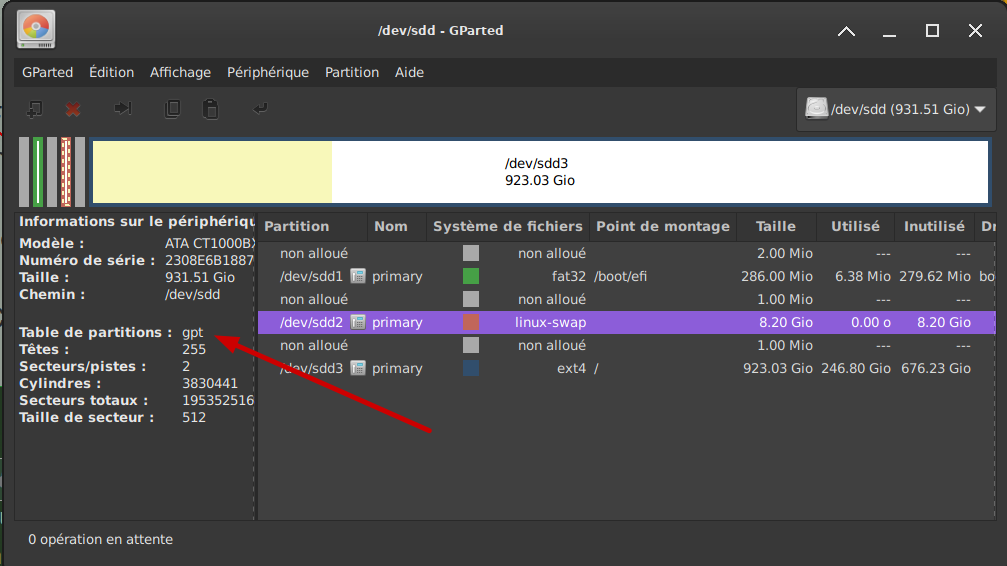

 Va falloir que je me penche dessus.