Bonjour à tous.
Actuellement sur mint 19.3 Tricia je souhaite upgrader sur Mint 20 puis mint 21. J'ai installé mintupgrade mais ca ne fonctionne pas.
Voci le résultat de "mintupgrade check:
yvon@HP-All-in-One-Mint:~$ mintupgrade check


    Executing 'check'. This will perform the following:

    1 - Your repositories will be switched to point to Linux Mint 20 'Ulyana' and
        any 3rd party repositories will be removed. A backup of your APT sources
        will be written to /home/yvon/Upgrade-Backup-tricia/APT.

    2 - The upgrade will be simulated so impacted packages can be evaluated.

    Your sources will be restored to Linux Mint 19.3 'Tricia' at the end of this command.

   Do you want to continue? [y/n]: y

  + Checking your Linux Mint codename...

  + Checking your Linux Mint edition...

  + Checking your Timeshift configuration...

  + Updating cache...

[sudo] Mot de passe de yvon :
Réception de :1 http://security.ubuntu.com/ubuntu bionic-security InRelease [88,7 kB]
Atteint :2 http://ppa.launchpad.net/graphics-drivers/ppa/ubuntu bionic InRelease
Ign :3 http://packages.linuxmint.com tricia InRelease
Atteint :4 http://archive.ubuntu.com/ubuntu bionic InRelease
Atteint :5 http://archive.canonical.com/ubuntu bionic InRelease
Réception de :6 http://archive.ubuntu.com/ubuntu bionic-updates InRelease [88,7 kB]
Atteint :7 http://packages.linuxmint.com tricia Release
Réception de :9 http://archive.ubuntu.com/ubuntu bionic-backports InRelease [83,3 kB]
261 ko réceptionnés en 2s (122 ko/s)
Lecture des listes de paquets... Fait

  + Checking your APT repositories...

------------------------------------------------
!!  ERROR: The following 3rd party repositories were detected. Disable them and refresh your APT cache.

    - Proprietary GPU Drivers (LP-PPA-graphics-drivers) - ppa.launchpad.net

!!  Exiting.
------------------------------------------------

  + Restoring your backed up APT sources...

yvon@HP-All-in-One-Mint:~$
Je suis dépassé...
PS/ comment copier la fenetre du terminal ?
Merci à Tous.
Modifié en dernier par cyrille le mar. 6 déc. 2022 13:20, modifié 1 fois.
Raison :Ajout des balises CODE
HP desktop intel Core I3 8Go ram 64 bits Windows 10
Bientôt Linux Mint Cinnamon
yvon@HP-All-in-One-Mint:~$ mintupgrade check


Executing 'check'. This will perform the following:

1 - Your repositories will be switched to point to Linux Mint 20 'Ulyana' and
any 3rd party repositories will be removed. A backup of your APT sources
will be written to /home/yvon/Upgrade-Backup-tricia/APT.

2 - The upgrade will be simulated so impacted packages can be evaluated.

Your sources will be restored to Linux Mint 19.3 'Tricia' at the end of this command.

Do you want to continue? [y/n]: y

+ Checking your Linux Mint codename...

+ Checking your Linux Mint edition...

+ Checking your Timeshift configuration...

+ Updating cache...

[sudo] Mot de passe de yvon :
Réception de :1 http://security.ubuntu.com/ubuntu bionic-security InRelease [88,7 kB]
Atteint :2 http://ppa.launchpad.net/graphics-drivers/ppa/ubuntu bionic InRelease
Ign :3 http://packages.linuxmint.com tricia InRelease
Atteint :4 http://archive.ubuntu.com/ubuntu bionic InRelease
Atteint :5 http://archive.canonical.com/ubuntu bionic InRelease
Réception de :6 http://archive.ubuntu.com/ubuntu bionic-updates InRelease [88,7 kB]
Atteint :7 http://packages.linuxmint.com tricia Release
Réception de :9 http://archive.ubuntu.com/ubuntu bionic-backports InRelease [83,3 kB]
261 ko réceptionnés en 2s (122 ko/s)
Lecture des listes de paquets... Fait

+ Checking your APT repositories...

------------------------------------------------
!! ERROR: The following 3rd party repositories were detected. Disable them and refresh your APT cache.

- Proprietary GPU Drivers (LP-PPA-graphics-drivers) - ppa.launchpad.net

!! Exiting.
------------------------------------------------

+ Restoring your backed up APT sources...

yvon@HP-All-in-One-Mint:~$
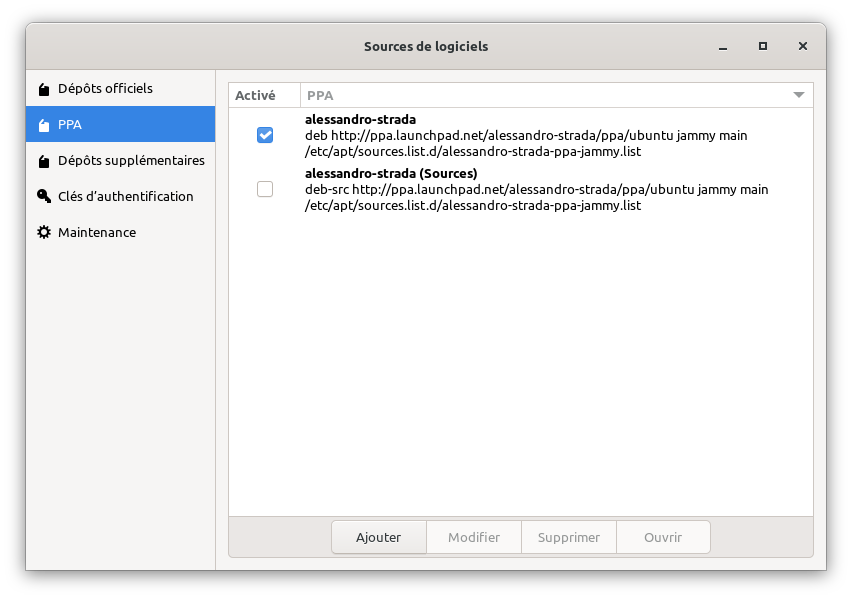
Sinon je pense que le message à retenir est bien celui qui te dit que tu as des dépôts tiers qui empêchent la migration. Lire ce post qui l'explique.
!! ERROR: The following 3rd party repositories were detected. Disable them and refresh your APT cache.

- Proprietary GPU Drivers (LP-PPA-graphics-drivers) - ppa.launchpad.net
Et je pense que tu as une piste comme montré dans cette copie de fenêtre.
Distrib : Linux Mint 22.3Desktop :X-Cinnamon 6.6.7 Kernel : 6.8.0-110-generic CPU : AMD Ryzen 5 5600H with Radeon Graphics RAM : 14Gi CG : NVIDIA Corporation TU117M [GeForce GTX 1650 Mobile / Max-Q] (rev a1)
Advanced Micro Devices, Inc. [AMD/ATI] Cezanne [Radeon Vega Series / Radeon Vega Mobile Series] (rev c6)